Protect the repository behind your GitHub CLI extension
A GitHub CLI extension is just a repository, but users install and run its code with a single command. That makes the repository’s release process part of your users’ software supply chain.


A GitHub CLI extension is just a repository, but users install and run its code with a single command:
$ gh extension install github/gh-actions-lock
✓ Installed extension github/gh-actions-lock
That makes the repository’s release process part of your users’ software supply chain. GitHub does not certify third-party extensions, and the CLI does not verify an extension’s release assets or attestations when installing them. A few repository settings can make a compromised account or workflow much less useful to an attacker.
The recommendations below focus on extensions distributed with versioned releases. The key distinction from a GitHub Action is that gh installs a binary from the latest release, or clones the default branch for a script extension. It does not use movable major or minor tags as automatic update channels.
1. Secure the accounts that can publish
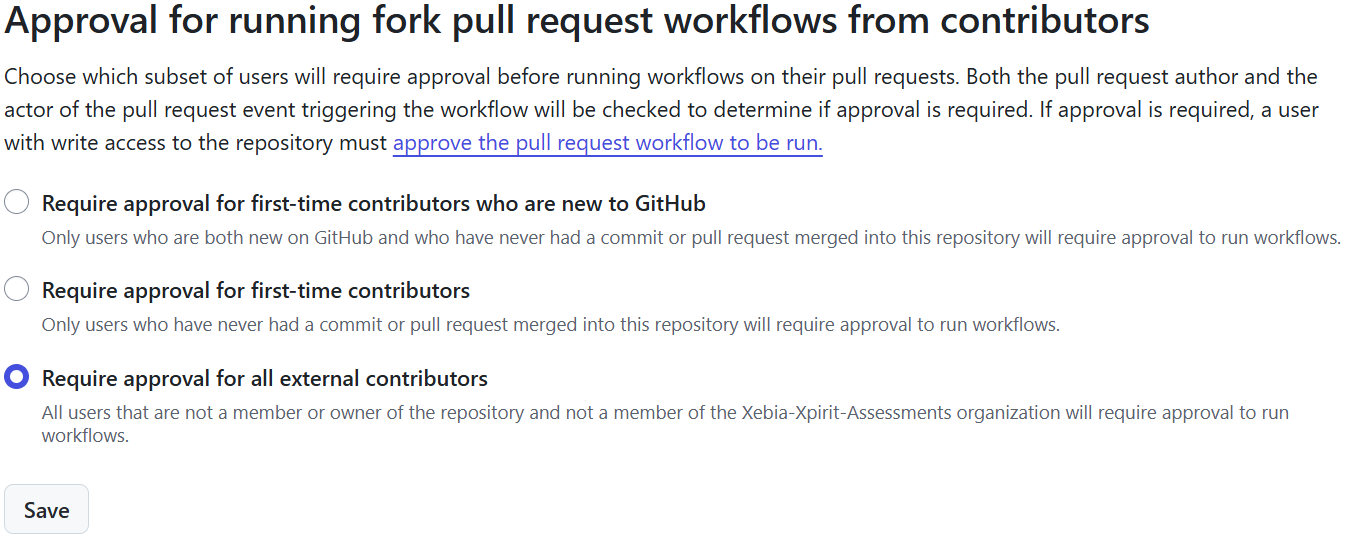
Turn on two-factor authentication for every maintainer account. If you publish from an organization, enforce it there and keep the number of people with write access small.
Prefer contributions through forks and pull requests over adding occasional contributors as collaborators. Anyone with write access can create, edit, or delete releases; that can expose users to a replaced binary even if the source tag itself has not changed.
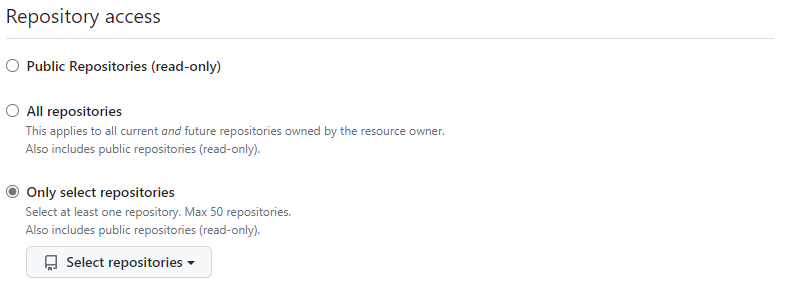
If you need a token for automation, use a fine-grained personal access token scoped to only the repositories it needs.
2. Protect the default branch
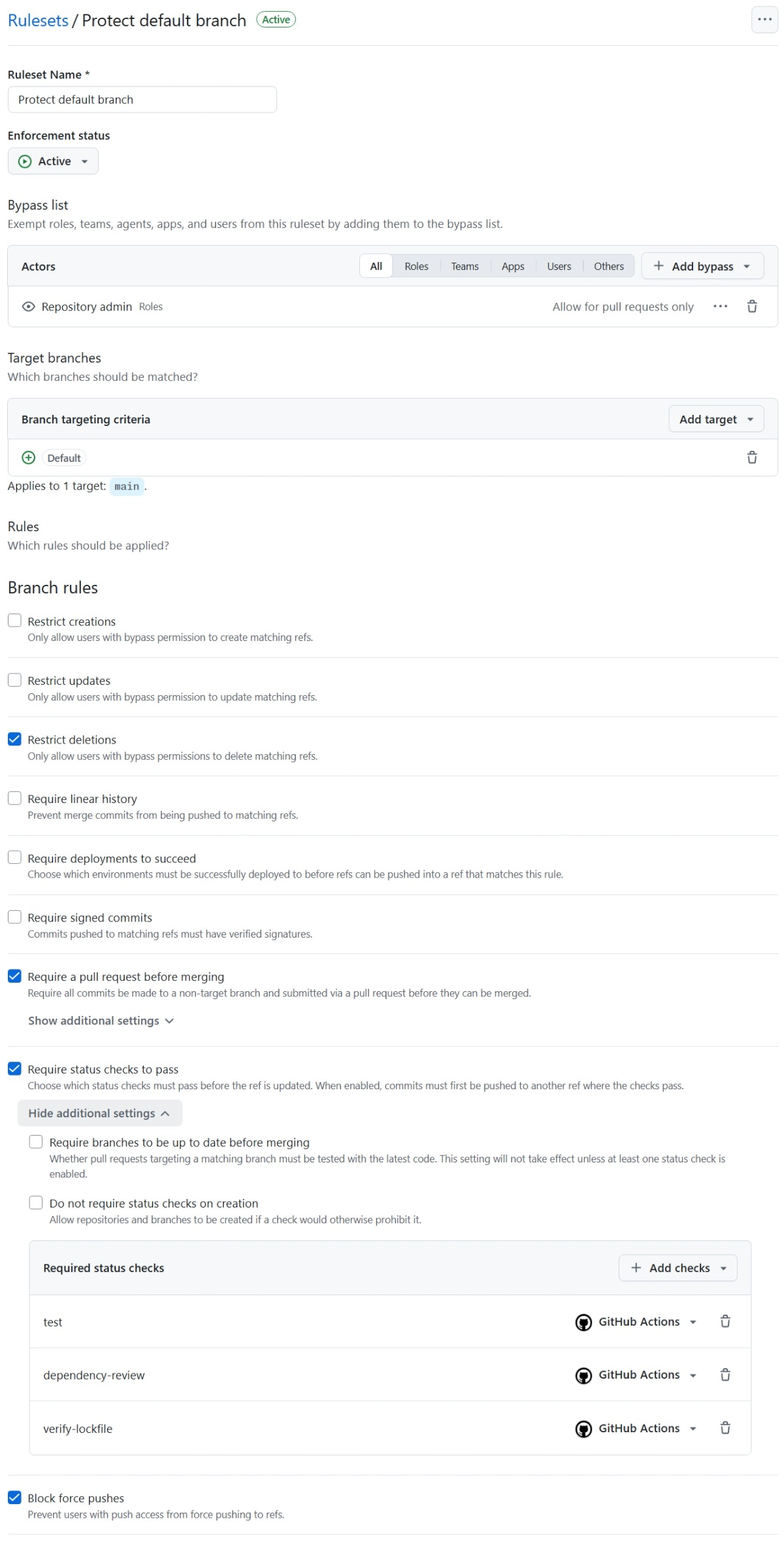
For script extensions, the default branch is the code users get when they install or upgrade. Protect it like a production release channel:
- Require changes to go through pull requests.
- Require the relevant tests and checks before merging.
- Require code-owner review for sensitive files, such as release workflows.
- Block force pushes and branch deletion.
- Keep bypass permissions limited to the people who need them.
For a solo-maintainer project, choose a bypass policy deliberately: a rule that nobody can bypass may make recovery difficult, while a broad bypass list weakens the protection.
Optional: require signed commits
You can add Require signed commits to the default-branch ruleset. This works best in enterprise setups, where signing keys can be issued, stored, rotated and revoked centrally, for example on hardware tokens or through a managed key vault. For a personal repository, only turn it on if you can keep your signing keys secure on every device you commit from.
Don’t treat a (verified) badge as proof of trust. As explained in The use or uselessness of signed commits, it shows that the signature is valid and belongs to a key registered on the account. It does not tell you:
- whether the account was compromised,
- whether the private key was stored securely,
- whether the account is the one you expected (
octocator0ctocat?), - whether the account still belongs to the same person,
- whether the signer reviewed what they signed.
A verified commit is only as trustworthy as the account and key behind it. Unless you can verify the state of the account owner’s account, it is not a trust signal on its own. Use signed commits as an extra layer, alongside pull requests, required checks and protected releases, not as a replacement for them.

3. Lock down version tags
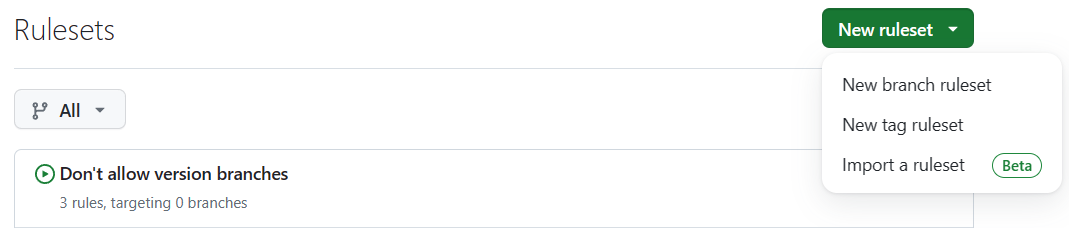
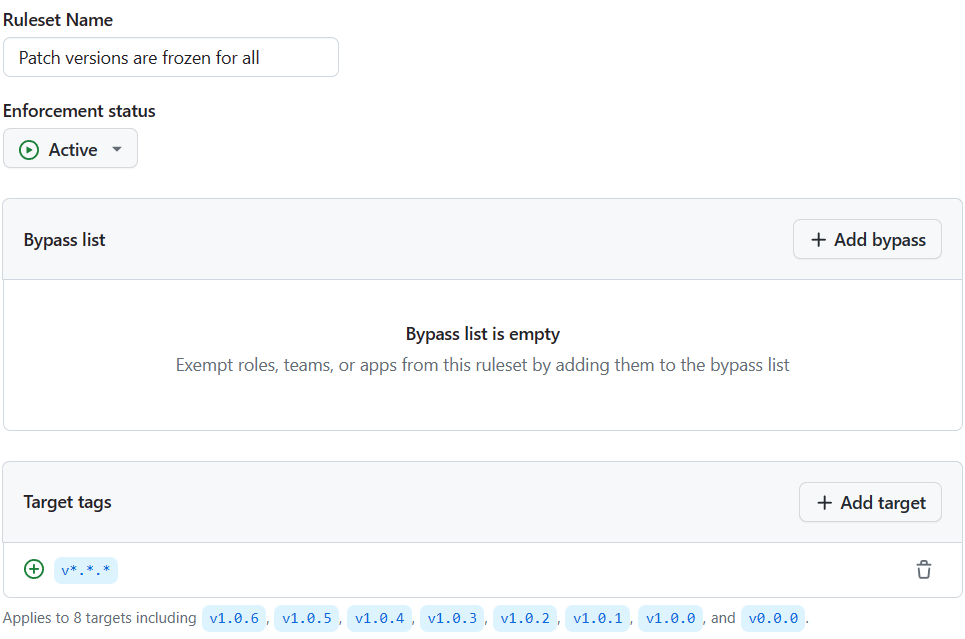
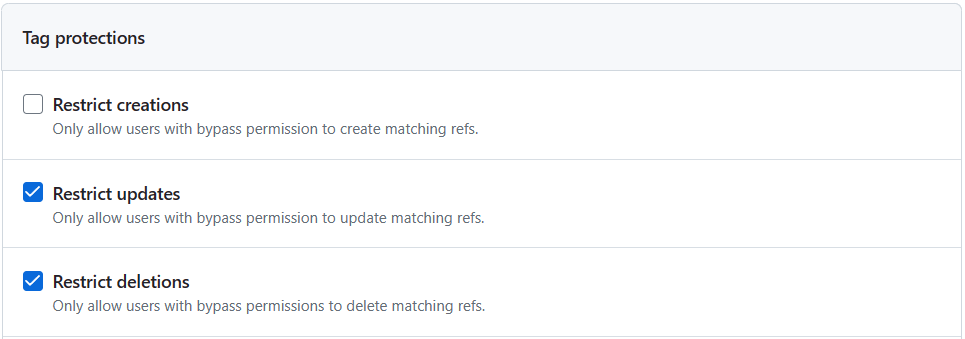
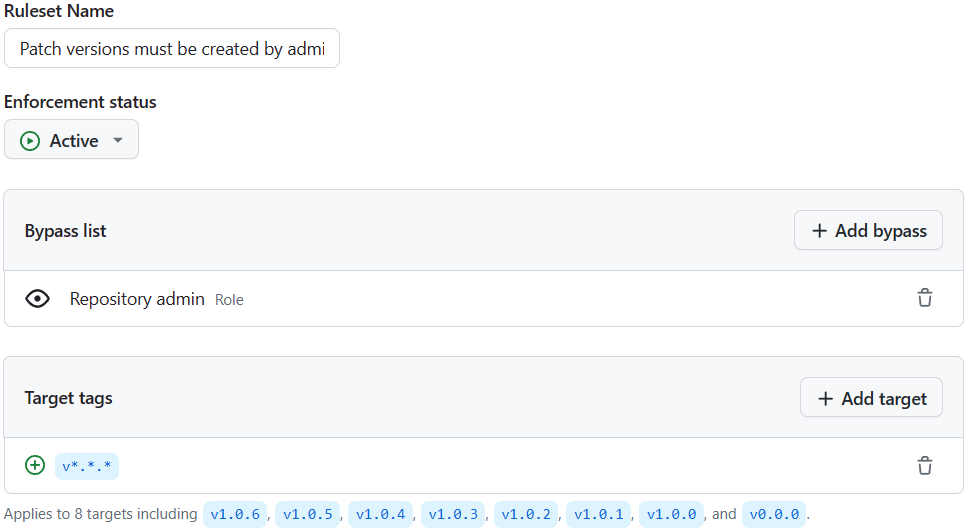
Use a tag ruleset for patch-version tags, such as v*.*.*:
- Restrict updates.
- Restrict deletions.
- Block force pushes.
- Restrict creation to repository administrators or the release automation identity.
This keeps a published version name from silently moving to a different commit. It also narrows who can mint a new version. GitHub rulesets apply to matching tag names; test your release workflow with the creation restriction before relying on it, since creating a release may create its tag as part of the same operation.
There is no need to add separate protections for floating major or minor tags as an extension update mechanism: gh does not follow them automatically. Keep the ruleset focused on the exact version tags that identify releases.


4. Enable immutable releases
Turn on release immutability in the repository’s release settings. Once published, an immutable release’s assets and associated tag cannot be changed. GitHub also creates a release attestation that records the tag, commit, and assets.
Immutability only applies to releases published after the setting is enabled. It is the strongest protection against someone replacing a release asset while leaving its tag untouched.


Remember that immutability is not a substitute for limiting write access. Release metadata such as the title, notes, prerelease status, and which release is marked latest can still be changed.
5. Publish only after the release is complete
Build and upload every asset before publishing the release:
- Create a draft release.
- Upload the platform binaries and checksums.
- Generate and attach build provenance.
- Publish the release.
This ordering is important because immutable releases cannot accept asset changes after publication. Check that your release action supports this sequence; some actions publish immediately or use --clobber when a release already exists.
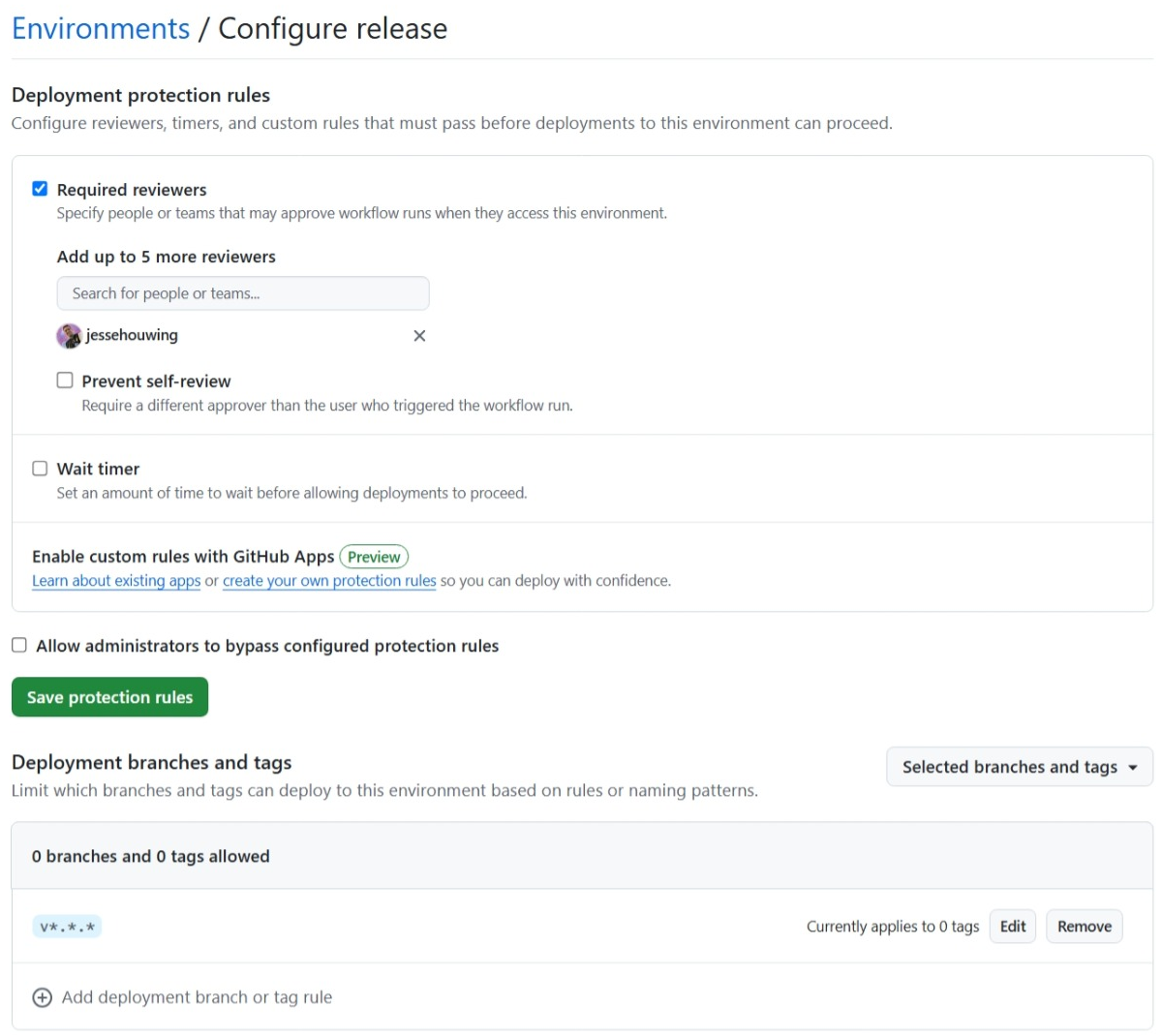
Use a release environment restricted to version tags if you want an additional approval gate. Keep release credentials in that environment, require review where appropriate, and prevent self-review. An environment gates the workflow job, however; it does not stop someone with repository write access from using the Releases API directly.
6. Generate provenance and make verification usable
If your build uses GitHub Actions, generate artifact attestations for the binaries. Grant only the release job the permissions it needs, typically contents: write, id-token: write, and attestations: write.
Document how users can verify a downloaded asset. Here is what that looks like for github/gh-actions-lock, which publishes immutable, attested releases. First, check that the release itself is intact:
$ gh release verify v0.4.1 -R github/gh-actions-lock
Resolved tag v0.4.1 to sha1:a8846ab4e4c1e34a7c40f65f2e78e98066913bf0
Loaded attestation from GitHub API
✓ Release v0.4.1 verified!

Assets
darwin-amd64       sha256:4ef64599440398999f184321d5237df131721434901ecaaf3da6aa018bdd1f8f
darwin-arm64       sha256:f205ea5dbbda67165e08aab1fb6395290ca62f0a038bf27d4b684abd0816635c
linux-amd64        sha256:39deb2fe714dbf74b073d8245fc7f3d50cd0eee18d5c0900e9e849ae933ae17e
windows-amd64.exe  sha256:d3582b58f907c145d673f5f31ebfa21a6570df04f3aca9cce667d129a3c607dc
...
Then download an asset and check it is the one listed in the release attestation:
$ gh release download v0.4.1 -R github/gh-actions-lock -p linux-amd64

$ gh release verify-asset v0.4.1 ./linux-amd64 -R github/gh-actions-lock
Calculated digest for linux-amd64: sha256:39deb2fe714dbf74b073d8245fc7f3d50cd0eee18d5c0900e9e849ae933ae17e
Resolved tag v0.4.1 to sha1:a8846ab4e4c1e34a7c40f65f2e78e98066913bf0
Loaded attestation from GitHub API

✓ Verification succeeded! linux-amd64 is present in release v0.4.1
Finally, check the build provenance to see which workflow built it:
$ gh attestation verify ./linux-amd64 --repo github/gh-actions-lock
Loaded digest sha256:39deb2fe714dbf74b073d8245fc7f3d50cd0eee18d5c0900e9e849ae933ae17e for file://linux-amd64
Loaded 1 attestation from GitHub API

The following policy criteria will be enforced:
- Predicate type must match:................ https://slsa.dev/provenance/v1
- Source Repository Owner URI must match:... https://github.com/github
- Source Repository URI must match:......... https://github.com/github/gh-actions-lock
- Subject Alternative Name must match regex: (?i)^https://github\.com/github/gh-actions-lock/
- OIDC Issuer must match:................... https://token.actions.githubusercontent.com

✓ Verification succeeded!

The following 1 attestation matched the policy criteria

- Attestation #1
  - Build repo:..... github/gh-actions-lock
  - Build workflow:. .github/workflows/release.yml@refs/tags/v0.4.1
  - Signer repo:.... github/gh-actions-lock
  - Signer workflow: .github/workflows/release.yml@refs/tags/v0.4.1
A release that was published without immutability has no release attestation, so the first check fails:
$ gh release verify v0.0.3 -R jessehouwing/gh-actions-version
no attestations for tag v0.0.3 (sha1:465c543411c0831b7d3b64111a229c982028eb43)
These are explicit checks for maintainers and users. gh extension install does not perform them automatically, so provenance is most useful when you explain how to validate it.
Side note: verifying an extension before you install or upgrade it
gh extension install and gh extension upgrade download a release asset without checking it, and you can’t make gh install a file you verified yourself. You can, however, check the release before you install it. The easiest way is gh verify-download, an extension by Michael Recachinas. It checks that the release is immutable and that the asset has build provenance before it downloads anything, and shows which workflow, commit and ref built it:
$ gh extension install mrecachinas/gh-verify-download
✓ Installed extension mrecachinas/gh-verify-download

$ gh release view -R github/gh-actions-lock --json tagName -q .tagName
v0.4.1

$ gh verify-download v0.4.1 -R github/gh-actions-lock -p linux-amd64
github/gh-actions-lock v0.4.1
✓ Immutable release, verified by GitHub's signed release attestation

linux-amd64
✓ Listed in the signed release attestation
✓ Verified SLSA build provenance
  - Build instructions: https://github.com/github/gh-actions-lock/blob/04b7a1a4d00b339dd3ff903bb4d78d4066b2bac7/.github/workflows/release.yml
  - Source:             https://github.com/github/gh-actions-lock/tree/04b7a1a4d00b339dd3ff903bb4d78d4066b2bac7
  - Source ref:         refs/tags/v0.4.1
  - Build run:          https://github.com/github/gh-actions-lock/actions/runs/41504210203/attempts/1
  - Runner:             github-hosted

$ gh extension install github/gh-actions-lock --pin v0.4.1
✓ Installed extension github/gh-actions-lock
✓ Pinned extension at v0.4.1
Use the asset name for your platform with -p, for example windows-amd64.exe or darwin-arm64.
A release without immutability still shows its build provenance, but warns you that the assets can be replaced:
$ gh verify-download v0.0.3 -R jessehouwing/gh-actions-version -p linux-amd64
jessehouwing/gh-actions-version v0.0.3
! Not an immutable release; assets can be replaced after publishing

linux-amd64
✓ Verified SLSA build provenance
  - Build instructions: https://github.com/jessehouwing/gh-actions-version/blob/465c543411c0831b7d3b64111a229c982028eb43/.github/workflows/release.yml
  - Source:             https://github.com/jessehouwing/gh-actions-version/tree/465c543411c0831b7d3b64111a229c982028eb43
  - Source ref:         refs/tags/v0.0.3
  - Build run:          https://github.com/jessehouwing/gh-actions-version/actions/runs/43714922719/attempts/1
  - Runner:             github-hosted
You don’t need to know the publisher’s workflow up front. The tool shows you which workflow signed the provenance, so you can judge whether it looks right. If any check fails, it asks before downloading (defaulting to No) or exits with an error in scripts.
gh verify-download is a binary extension itself. Its releases are immutable and attested, so its README shows how to check it with itself, or you can check its first release with gh release verify and gh attestation verify.
A few things to keep in mind:
- Pin the tag you checked. Without
--pin,ghlooks up the latest release again at install time, which may not be the one you checked. Pinning is only safe if the release is immutable; otherwise its assets can still change after your check. - Make sure you got a binary.
ghdecides between binary and script install from the latest release, even when you pin. If the installed extension has nomanifest.yml, it was cloned instead; treat it as a script extension. - Upgrading a pinned extension. Check the new tag, run
gh extension remove example, then install with--pinagain. Don’t rely oninstall --pin --forceon an already-installed extension, because it currently ignores the pin (cli/cli#13551). A plaingh extension upgradeinstalls whatever is latest without checking it. - No attestation is still an answer. If the release isn’t immutable or has no provenance, you can still choose to install. Just know you’re trusting the maintainer’s account and process, not a verifiable build.
- Script extensions can’t be checked this way. They are cloned from the repository rather than downloaded from a release. Review the code, and pin to a commit SHA with
--pin <sha>.
gh verify-download behaves like the gh release download --verify flag proposed in cli/cli#14789 (draft PR cli/cli#14783). If you’d like this built into gh, upvote that issue.
7. Reduce the risk in release automation
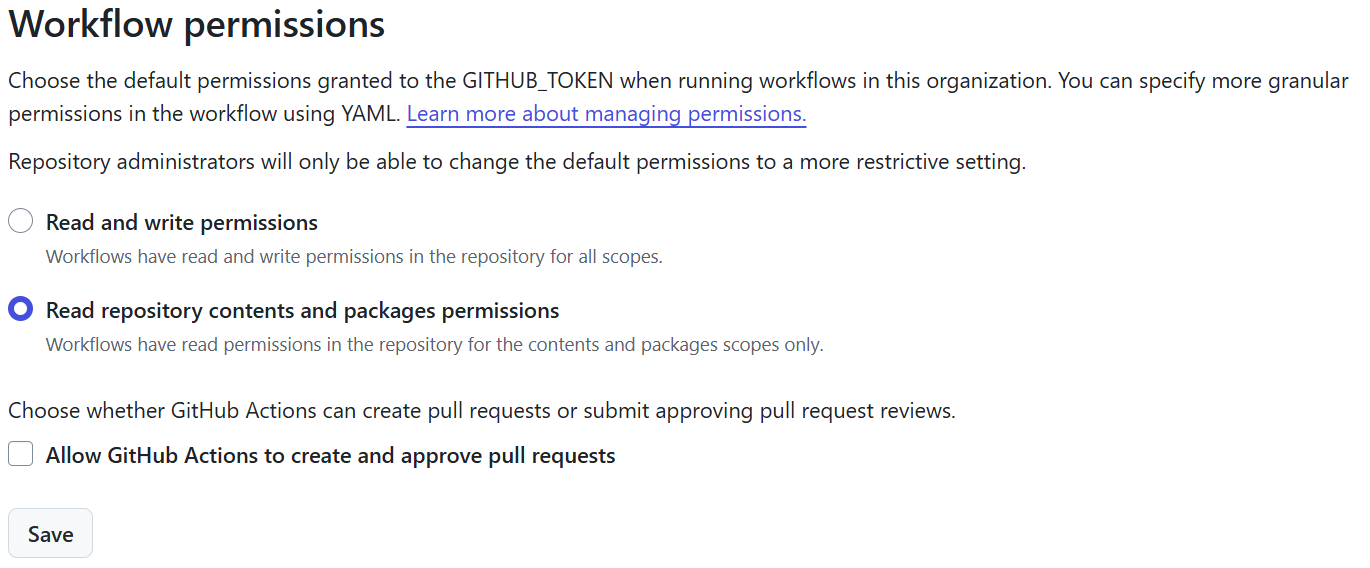
Workflows that publish binaries have powerful permissions. Keep those permissions scoped to the release job, default other workflows to read-only access, and do not allow Actions to create or approve pull requests unless the project requires it.
Avoid unnecessary dependencies in the release path, and lock the ones you keep with a lock file. Lock files replace commit SHA pins in your workflow files:
- Generate
.github/workflows/actions.lockwithgh actions-lock. Keep readable version references such as@v2.2.0inuses:; the lock file records the commit behind each one, including the actions that composite actions call. That matters here:cli/gh-extension-precompileis a composite action that runsactions/setup-goandactions/attest-build-provenanceinternally. A SHA pin ongh-extension-precompiledoesn’t pin those; the lock file does. Because the workflow files keep version numbers, Dependabot can still raise security alerts for them, which it can’t do for SHA pins. - Keep the lock file current and checked. Dependabot regenerates the lock entry when it bumps an action, and a cooldown (
cooldown: default-days: 7) keeps you from being among the first to pull in a compromised release. Add a workflow that runsgh actions-lock --verifyon pull requests and make it a required status check, so a stale or tampered lock file can’t be merged. GitHub’s ownverify-lockfile.ymlis a good starting point. Review lock-file diffs: a changed SHA means the code your release runs has changed. - Turn on the “Require lockfile” Actions policy. Under Settings → Actions → Policies, a workflow execution protection can block any targeted workflow that isn’t covered by the lock file. That stops a pushed or edited workflow, for example the release workflow, from running unlocked code. It’s available at repository level, also for personal repositories. Evaluate mode is only available on GitHub Enterprise Cloud, so elsewhere run
gh actions-lock --verifyfirst and then go straight to Active. The policy only covers step-leveluses:; reusable workflows from other repositories must be onboarded to a lock file in their own repository. - Optionally restrict allowed actions. An allow-list of the actions you actually use adds defence in depth. If you previously required SHA pins, switch to the lock file and the “Require lockfile” policy instead.
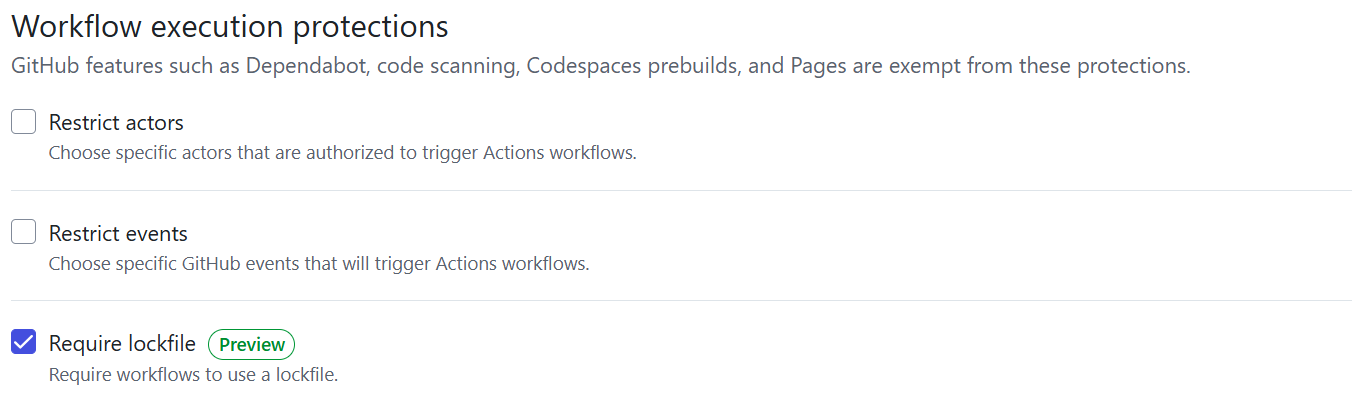
For a broader overview of these Actions protections, see Keep the creepy crawlies out of your workflows.
Running the check locally shows what the required check will catch. Here it also flags a container image that a lock file can’t pin:
$ gh actions-lock --verify
Scanning 5 workflows
container image ghcr.io/ossf/scorecard-action:v2.5.0 is not pinned by digest
↳ used by .github\workflows\scorecard.yml: ossf/scorecard-action@v2.5.0
↳ the lockfile pins action commits, not container images; ask the maintainer of ossf/scorecard-action@v2.5.0 to pin it by digest
↳ https://github.com/github/gh-actions-lock/blob/main/docs/troubleshooting.md#container-image
All 5 workflows valid
8. Turn on the free security features
Public repositories get most of GitHub Advanced Security at no cost, so there is little reason to leave these off:
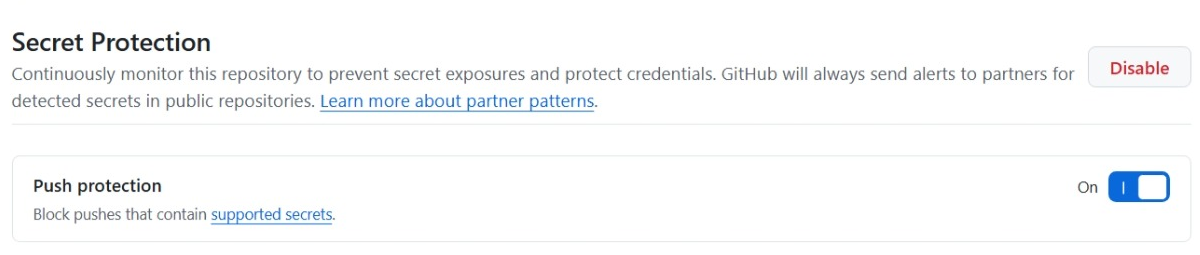
- Secret scanning and push protection. Secret scanning finds credentials that were already committed. Push protection blocks new ones before they reach the repository. A leaked token with write access is exactly what an attacker needs to publish a rogue release.
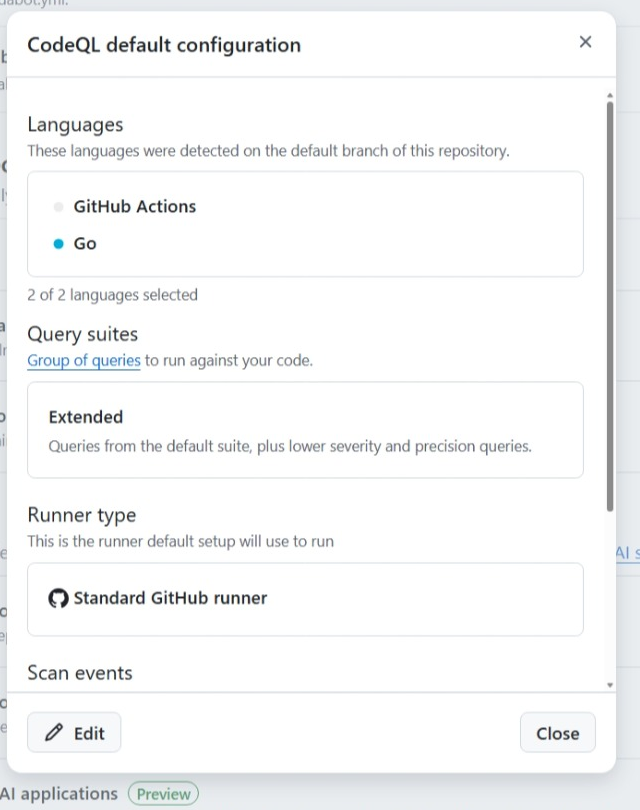
- Code scanning with CodeQL. The default setup takes a few clicks and analyses both your code and your workflows. The GitHub Actions analysis flags risky patterns such as untrusted input in
run:steps and overly broadGITHUB_TOKENpermissions, which are a common way into a release pipeline.
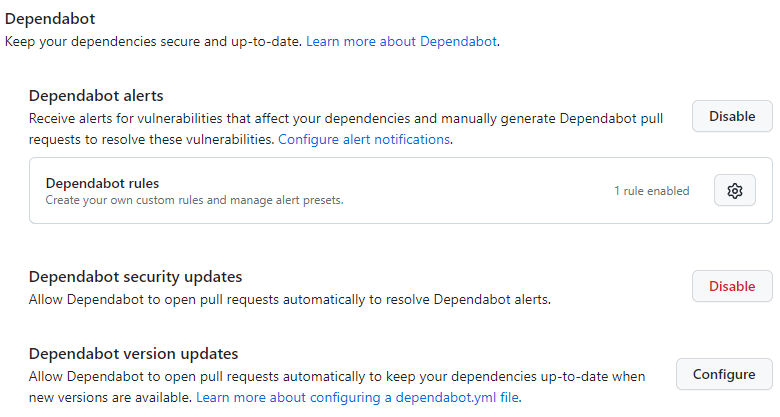
- Dependabot alerts, security updates and version updates. Configure version updates for every ecosystem you use, such as
gomodandgithub-actions.
- Dependency review. It shows vulnerable or newly added dependencies in pull requests before they are merged.
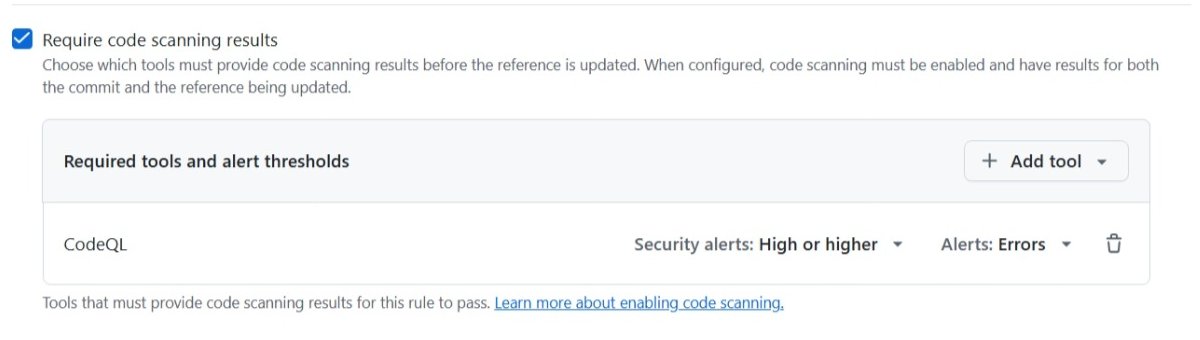
Make these checks part of your default-branch ruleset rather than just dashboards:
- Add Require code scanning results, so pull requests with new high-severity alerts can’t be merged.
- Add the dependency-review check as a required status check.
These features can catch problems before they ship in a release; check feature availability and billing for your account.
9. Keep releases predictable
Use one consistent version-tag format, such as v1.2.3, and ensure the release marked latest is actually the newest stable version. gh compares release tag names to detect binary updates; it does not use semantic-version ordering to decide which release is newer.
Keep generated executables out of the source tree. Apart from making reviews harder, a root-level executable with the extension’s name can affect how the CLI treats the repository.
A practical baseline
For most binary or script extensions, start with:
- 2FA and a small set of trusted maintainers.
- Pull-request and status-check protection on the default branch, optionally with required signed commits.
- A
v*.*.*tag ruleset that blocks updates, deletions, and force pushes, with restricted creation. - Immutable releases, published only after assets and provenance are ready.
- A release workflow with minimal permissions and an environment gate if approvals are needed.
- An
actions.lockfile covering every workflow, including composite actions’ dependencies, verified on every pull request as a required check and enforced with the “Require lockfile” Actions policy. - Secret scanning, push protection, CodeQL code scanning and Dependabot, plus Code Quality where available; check eligibility and billing, and enforce available scanning and quality checks through the default-branch ruleset.
- Clear instructions for users to verify release assets and attestations.
The goal is not to make publishing impossible. It is to make the trusted path clear, limit who can change it, and prevent a published version from becoming a different program without users noticing.