Keep the creepy crawlies out of you workflows: securing GitHub Actions in 2026
GitHub Actions is now one of the most used CI/CD platforms in the world, which also makes it an attractive target for attackers. After several large supply chain attacks, GitHub made many changes and added improvements to how Actions works over the past year.


GitHub Actions is now one of the most used CI/CD platforms in the world, which also makes it an attractive target for attackers. After several large supply chain attacks, GitHub made many changes and added improvements to how Actions works over the past year. Many of the new protections are opt-in for existing organisations, and some of them are breaking changes. This article covers the attacks and the new protections, and ends with five things you should do now.
Fast growth and weak defaults
GitHub introduced Actions in 2018 as a way to automate anything that happens in a repository: any event can start a workflow. In August 2019 Actions added CI/CD and became free for public repositories, which at that time meant around 40 million developers. It became generally available in November of that year.
The Marketplace now lists more than 30,000 actions. According to GitHub, Actions ran about 23 million jobs a day in early 2024, and 71 million a day after GitHub rebuilt its backend. Public and open source projects alone used 11.5 billion Actions minutes in 2025, 35% more than the year before.
Many of the early defaults favoured ease of use over security. Every workflow received a GITHUB_TOKEN that could read and write almost everything in the repository. Workflows could approve pull requests, which was enough to satisfy a "required approvals" rule. In 2020 GitHub added pull_request_target, a trigger that runs the workflow of the base repository with a write-capable token and access to secrets. A normal pull_request workflow from a fork only gets a read-only token and no secrets, which made it impossible for maintainers to label or comment on those pull requests automatically. The new trigger was meant to solve that.
GitHub tightened the defaults step by step. In 2021 it stopped supporting abbreviated commit SHAs in uses:. That left the full-length SHA as the only way to pin an action to code that cannot change. In the same year GitHub added the permissions: key, required approval for workflow runs from first-time contributors, and introduced OpenID Connect for cloud deployments. In 2022 it added a setting to stop Actions from approving pull requests, but to avoid breaking existing workflows, GitHub left the permissive option enabled by default. In February 2023 the default token finally became read-only, but for new organisations and repositories only. Existing repositories had to opt in to the new default.
Several of these decisions later led to serious security incidents.
The industrialisation of CI/CD attacks
In 2021 the GitHub Security Lab described the "pwn request"[1]: a pull_request_target workflow that checks out and runs code from a fork. It also showed how pull request titles and branch names that are inserted into a run: script with ${{ }} become shell injections, and it warned that masking secrets in logs does not really protect them, because code in the workflow can still read them and print them in another form. In 2023 Chainguard showed that a commit pushed to a fork can be referenced as if it belongs to the original action, a so-called "impostor commit". In the same year, researchers from Purdue University and North Carolina State University found injection vulnerabilities in a large number of open source workflows. In 2024 Adnan Khan showed that a workflow with a read-only token and no secrets could still poison the Actions cache and use it to attack release workflows. Palo Alto Networks' Unit 42 found tokens in the build artifacts of projects owned by Google, Microsoft and AWS.
By the end of 2024, these techniques started to appear in real attacks.
Ultralytics, December 2024. Attackers opened a pull request with a malicious branch name. A workflow inserted that name into a shell command, which gave the attackers code execution in the build of a very popular computer vision library. They used that access to poison the GitHub Actions cache. Four releases with a cryptominer were published to PyPI. The project's own release workflow restored the poisoned cache and built the first two. The attackers uploaded the other two with a PyPI token that had not been revoked.
tj-actions/changed-files, March 2025. This attack started one step earlier, at reviewdog/action-setup. That compromise most likely exposed the personal access token of the tj-actions bot. The attackers used the token to move every version tag of tj-actions/changed-files, an action used in more than 23,000 repositories, to a malicious commit. That commit dumped the memory of the runner and wrote the secrets it found into the workflow log, encoded twice with base64. In public repositories, anyone could read those logs. The real target turned out to be Coinbase. Only users who had pinned the action to a full commit SHA were not affected.
Nx, August 2025. On 21 August a pull request, generated with an AI coding assistant, added a pull_request_target workflow that inserted the pull request title directly into a bash command. The workflow was removed the next day, but it still existed on older branches. On 24 August an attacker used it. The repository still used the read/write default from before 2023, so the stolen token could start the release workflow and steal the npm publishing token. Malicious versions of Nx, a package with around six million weekly downloads, were available for about four hours. The malware used the victims' own AI command-line tools to search for credentials, and a second wave made more than 5,500 private repositories public. The Nx postmortem points to the same root cause: GitHub changed the default in February 2023, but it never updated existing repositories.
Shai-Hulud and Shai-Hulud 2.0, September and November 2025. Shai-Hulud built on the Nx incident and was the first npm worm that spread by itself. It started in an infected npm package, but it used GitHub Actions to spread. On every machine where the package was installed, it collected GitHub and npm tokens. With the GitHub tokens, it pushed a new workflow to every repository it could reach. GitHub then ran that workflow like any other, with access to the secrets of the repository, and the workflow sent those secrets to the attackers. With the stolen npm tokens, the worm published infected versions of more packages, and the cycle started again. GitHub removed more than 500 infected packages. The second wave, Shai-Hulud 2.0, hit more than 25,000 repositories and ran during preinstall. It also registered infected machines as self-hosted runners, so the attackers could control them remotely through Actions workflows, as GitHub later explained in its own analysis.
TeamPCP, March 2026. A workflow in the Trivy repository, which its authors believed was secure, was vulnerable to a pwn request. It had been attacked earlier, and that incident had not been fully contained. This allowed the attackers to force-push 75 of the 76 trivy-action version tags and to push impostor commits to actions/checkout. Every pipeline that ran a Trivy scan leaked its secrets. Within days, the stolen credentials were used to compromise the KICS action and the LiteLLM package on PyPI.
Mini Shai-Hulud, May 2026. TeamPCP returned with a new variant that poisoned the Actions cache in a TanStack pull request workflow. When a maintainer later merged code, the legitimate release workflow restored the poisoned cache and ran the attacker's code. The worm used the runner's credentials through npm's OIDC publishing endpoint, rather than stealing an npm token directly. The following day, the fully weaponised worm was released in public repositories, making the toolchain available to other operators[2].
These incidents follow the same pattern. A vulnerable workflow leaks a token, and the token is used to publish a malicious package or action. That package runs on developer machines and CI runners, where it steals more tokens. A worm repeats this without human involvement, and it spreads quickly. In its analysis of these attacks, Wiz notes that the time between a compromise and its detection is now measured in hours. GitHub came to the same conclusion in its 2026 roadmap[3]: attackers now target the CI/CD automation itself, as well as the software it builds. Log masking does not stop this. A memory dump gives attackers the secrets, and simple encoding lets them exfiltrate those secrets, often through the logs. For a public repository, those logs are public.
GitHub asks the community
On 7 November 2025 GitHub announced the first breaking change to pull_request_target. On the same day it opened a public discussion called "Towards a secure by default GitHub Actions"[4]. They asked the community which changes would have the most immediate effect on the security of workflows, and of the supply chains that depend on them.
Many practitioners and security researchers, including me, joined the discussion. They described the problems they saw in their own organisations and proposed possible solutions, and GitHub's engineers responded in the thread. The discussion once again showed the tension between adding security and not breaking critical workflows across the whole ecosystem. In an organisation with 8,000 repositories, you cannot fix every workflow by hand before a setting changes.
When the first change was enforced, many users only learned about it because their workflows had broken. The change to environment branch rules, which was part of the same update, had broken deployments that matched on branch names. Other users asked why GitHub had not added warning annotations to workflow runs in advance, and one even threatened to move to GitLab. GitHub replied that it had not made the decision lightly, and that these breaking changes were necessary to make Actions more secure.
Most of the larger changes in 2026 came with an evaluate or log mode, or with an enforcement date that was announced in advance.
What GitHub changed
Most of the changes GitHub made in the past twelve months address some specific part that enabled the attack patterns described above.
Changes to pull_request_target
Since 8 December 2025, pull_request_target always runs the workflow definition from the default branch. An attacker can no longer target a vulnerable workflow that still exists on an old branch, which is what happened at Nx. Fixing the workflow on the default branch is now enough.
In June 2026 GitHub addressed the pwn request itself. actions/checkout v7 refuses to check out the code of a pull request from a fork in pull_request_target workflows, and in workflow_run workflows that were triggered by a pull request. To override this, you have to add the input allow-unsafe-pr-checkout. GitHub chose that name so it stands out in code review:
 on: pull_request_target
 ...
       - uses: actions/checkout@v7
         with:
           ref: ${{ github.event.pull_request.head.sha }}
+          allow-unsafe-pr-checkout: true
On 20 July GitHub backported this protection to all supported major versions except v1. Workflows that use a floating tag such as actions/checkout@v4 received it automatically. Workflows pinned to a full SHA, as security guidance has recommended for years, by design do not receive it and need to be updated. The protection blocks the most common pattern by default, and though it does not solve every possible variant, it is a big step forward. A run: step that fetches the pull request with git or the gh CLI can still bring in untrusted code, and so can pwn requests through other triggers such as issue_comment.
actions/checkout no longer leaks the token
Since v2, actions/checkout has stored the job's token in .git/config, so that later git commands can use it. If you uploaded your workspace as an artifact, or copied it into a container image, the token was included. The ArtiPACKED research found tokens that had leaked this way.
In September 2024 GitHub changed upload-artifact to skip hidden files by default. And in November 2025 checkout v6 moved the credential out of the repository to a file under $RUNNER_TEMP. If your job does not need to push, persist-credentials: false is still the safer choice.
Workflow execution protections
By default, every user with write access to a repository can trigger its workflows. Workflow execution protections, generally available since 17 September 2026, let you change that. They are built on rulesets and repository custom properties, and you can configure them at enterprise, organisation and repository level. Actor rules define which users, roles, GitHub Apps, Copilot or Dependabot may trigger a workflow. Event rules define which events may start one. A third rule, "Require lockfile", only lets a workflow run when it has a lock file for its actions. It is described further in the section on pinning. You can apply these rules to specific workflow files. For example, you can allow only maintainers to run workflow_dispatch on deploy.yml, or block pull_request_target across the organisation. You can run the rules in evaluate mode first, and the insights show which runs would have been blocked.
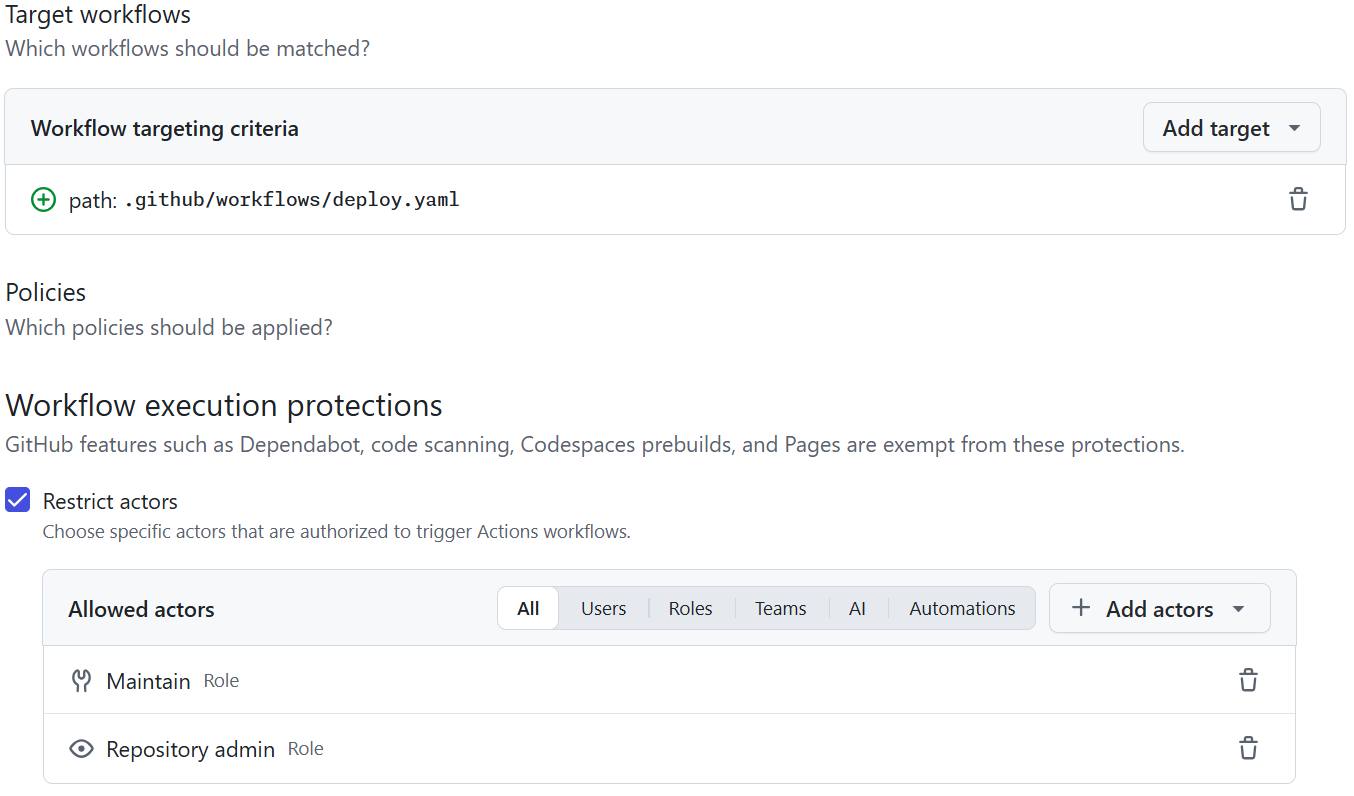
An actor rule that only lets maintainers and repository administrators trigger the deployment workflow.
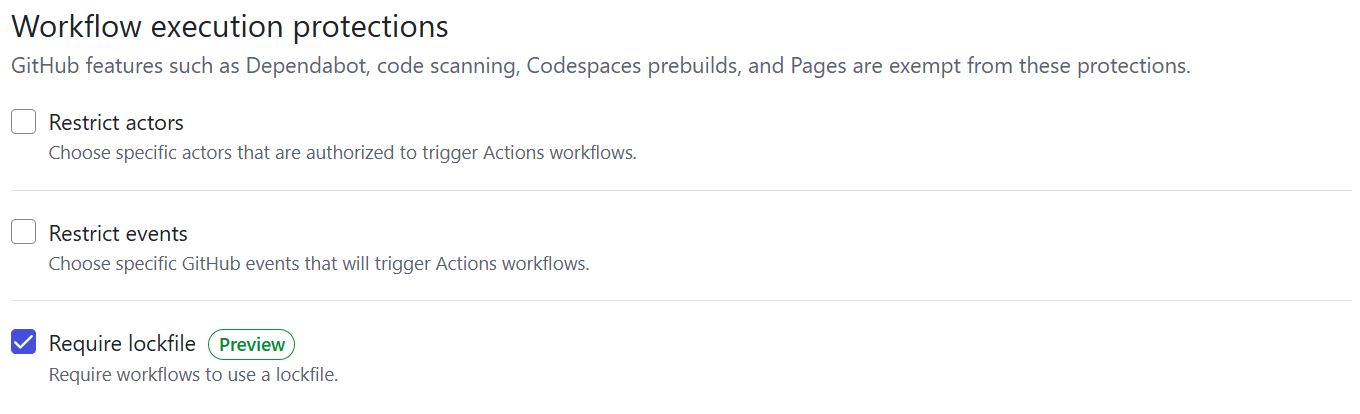
The protections a ruleset can apply.
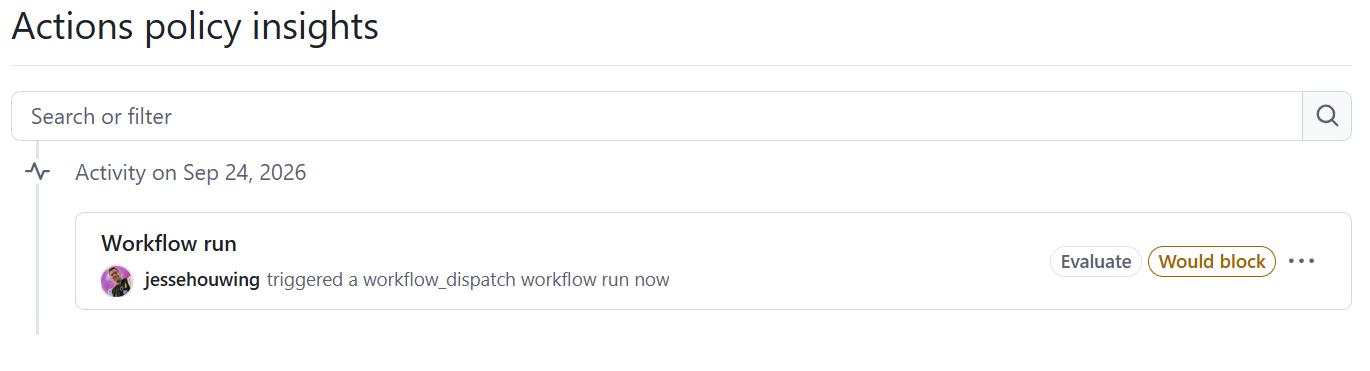
In evaluate mode, the policy insights show which runs a rule would have blocked.
GitHub also added a default rule. Public repositories that do not have their own event policy now automatically disable pull_request_target. The rule runs in evaluate mode now and will be enforced from Monday 2 November 2026. Private and internal repositories are not affected. If a workflow really needs the trigger, you can allow it explicitly for that single workflow file.
Rules like these only help when the attacker does not already have write access. Shai-Hulud used stolen credentials to push new workflows, and GitHub started those runs just like any other, because they came from an account that was allowed to push. To stop this, GitHub now holds workflow runs in public repositories that it considers potentially malicious. A held run only starts after a collaborator with write access approves it in an authenticated web session.
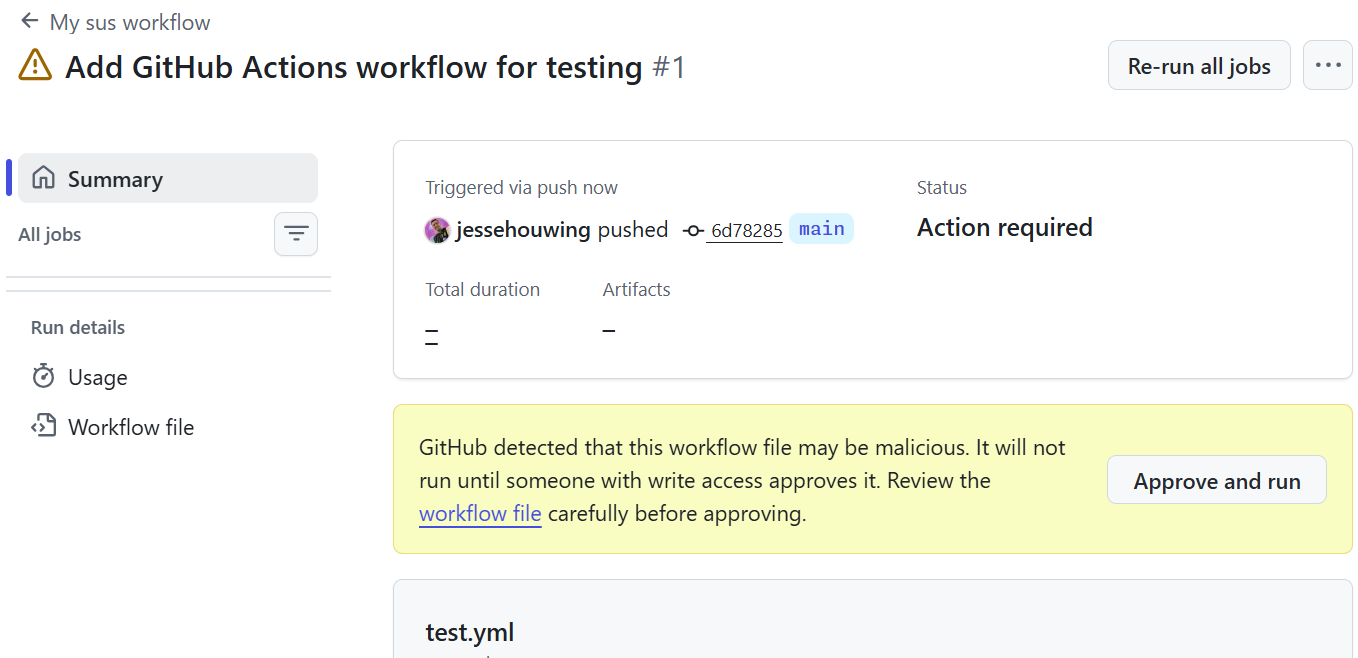
GitHub holds a potentially malicious workflow run until someone with write access approves it.
Read-only caches and cache-mode
Since 26 June 2026 the cache token is read-only for events that someone without write access can trigger, when they run in the cache scope of the default branch. This covers pull_request_target, issue_comment and workflow_run chains that start from a fork. It blocks the attack Adnan Khan demonstrated, in which a low-trust workflow poisons a cache entry that a trusted push or schedule workflow restores later.
The cache-mode setting, generally available since 10 September, gives you more control. You can set it to read, write, write-only or none for a workflow or for a single job. The cache service enforces the setting, and a reusable workflow cannot get more cache access than the workflow that calls it. In 2024 Khan already advised against caching in release workflows. With cache-mode: none you can now enforce that:
+cache-mode: read
+
 jobs:
   build:
     runs-on: ubuntu-latest
+    cache-mode: write
   release:
     runs-on: ubuntu-latest
+    cache-mode: none
The workflow-level setting applies to every job, and a job-level setting overrides it. A job that tries to save or restore outside its mode does not fail. The cache step logs a message and continues.
Pinning, lock files and immutable releases
Since August 2025 an organisation can require that every action is pinned to a full-length commit SHA[5]. Workflows with unpinned actions then fail instead of only showing a warning. The same policy can block a specific action with a ! prefix, which is useful during an incident.
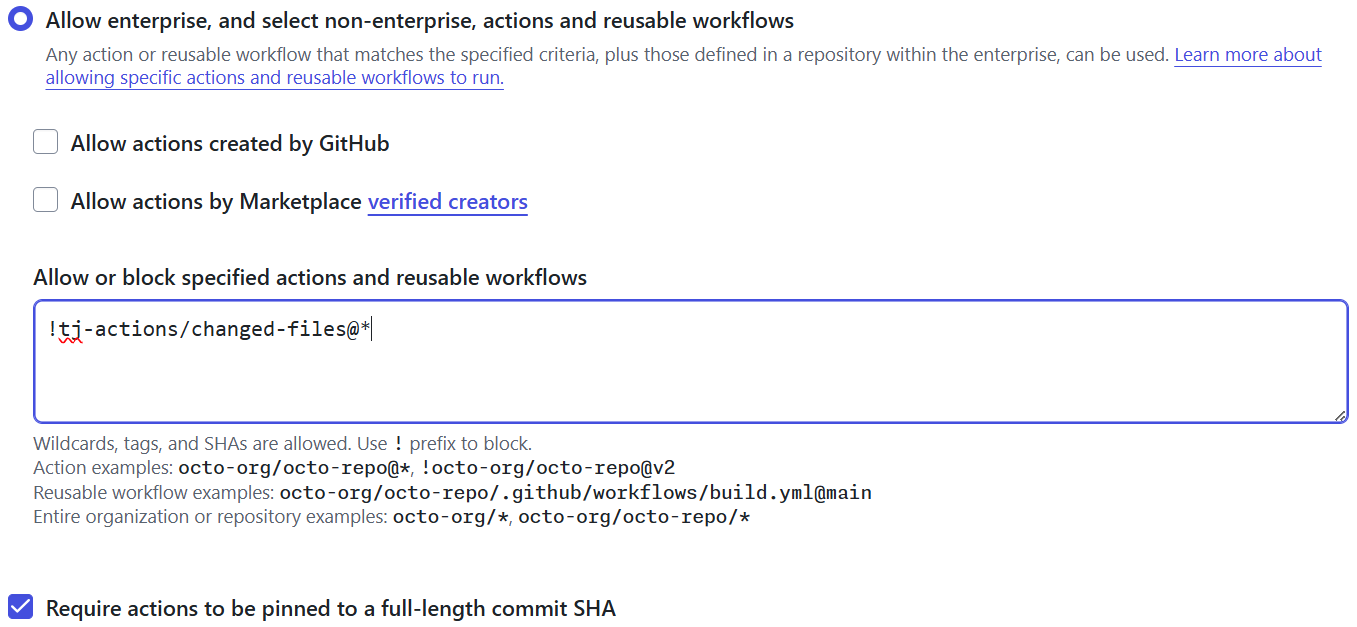
Blocking every version of a compromised action in the organisation's Actions policy. The SHA pinning option on the same page still works, but the lock files described below pin actions more completely.
The $/ syntax, added in July 2026, fixes a related problem with actions that live in the same repository as the workflow. Before this, there were two ways to reference them. With a ./ path, the runner executes whatever files are at that path on its disk when the step starts. Usually a checkout put them there, but an extracted zip file, a downloaded artifact or any earlier step that writes to the workspace can put them there too. In the Trivy attack, the workflow checked out the pull request and then ran an internal action from that checkout, which the attacker had replaced.
The other way was a reference such as my-org/my-repo/.github/actions/setup@v1. That reference does not follow the commit that is running, so a caller who pins your reusable workflow to a SHA still gets whatever v1 points to. A hard-coded SHA avoids that, but then you have to update the reference after every change. In both cases your SHA pins protect less than you think, which GitHub also acknowledges in its announcement. A $/ reference resolves to the workflow's own repository at the exact commit that is running, so it does not depend on what is on the disk of the runner. You do not even need a checkout for it:
     steps:
-      - uses: actions/checkout@v6
-      - uses: ./.github/actions/setup
+      - uses: $/.github/actions/setup
The same works for reusable workflows in the same repository:
 jobs:
   build:
-    uses: my-org/my-repo/.github/workflows/build.yml@v1
+    uses: $/.github/workflows/build.yml
A $/ reference in a reusable workflow always resolves against the repository of that reusable workflow, not the repository that calls it. The syntax is not available on GitHub Enterprise Server.
Pinning to a SHA also has drawbacks. A SHA is hard to read, you have to maintain it in every workflow file, and, as I explained in my trust checklist[6], a SHA on its own does not protect you against an impostor commit. Two newer features address this.
Immutable releases, generally available since October 2025, are a feature for publishers of actions. Once enabled, newly published releases cannot be changed and GitHub generates a signed attestation. Existing releases remain mutable until they are published again. My jessehouwing/actions-semver-checker action[7] republishes existing releases and checks that floating tags point to the latest patch release.

Publishers enable immutable releases in the repository settings. Existing releases stay mutable until they are published again.
github/gh-actions-lock[8] is a tool for consumers of actions, and a new way to pin them. When you generate .github/workflows/actions.lock, it records the commit SHA behind every action reference automatically, including the actions that composite actions use, so your workflow files can keep readable version references. The "Require lockfile" workflow execution protection lets you require a lock file for every workflow. If you currently require SHA pins, you'll also want to add this rule: generate lock files, run the rule in evaluate mode and then enforce it.
| Approach | Advantages | Limitations |
|---|---|---|
| SHA pinning | Locks an action to one exact commit and works with every action today. It does not depend on the publisher enabling a setting. GitHub can enforce full-length SHA pins in Actions policy, and Advanced Security for Actions understands them. | Commit SHAs are difficult to read and maintain. You must update every reference yourself, and a SHA alone does not prove that the commit belongs to the release you intended. It also does not lock dependencies used inside a composite action. |
| Immutable releases | Keeps a readable version such as v1.2.3, prevents the tag and release assets from being changed, and provides a signed attestation. |
The action publisher must enable it. No Actions policy currently recognises an immutable release as immutable, so you cannot trust these references through policy. Floating tags such as v1 are not protected, and an immutable release does not lock transitive dependencies by itself. |
| Lock files | Records the exact commits behind the action references and checks that they still belong to the expected refs. Its distinct advantage is that it also locks transitive dependencies used by composite actions. GitHub can enforce lock file use with the "Require lockfile" workflow execution protection, and Advanced Security for Actions understands lock files. | The lock file has to be generated, reviewed and updated. In a large monorepo, all workflows share the same lock file. Dependency update tools such as Dependabot and Renovate are still rolling out support. |
These approaches can be combined. Lock files provide the strongest protection for consumers, because they fix the complete set of action commits, including the dependencies of composite actions. Immutable releases provide the strongest protection for authors, because published tags and release assets cannot be replaced. No policy recognises immutable releases yet, and they do not lock transitive dependencies, so combine them with lock files. Authors then publish a verifiable release, and consumers independently lock the exact dependency graph they run. Traditional SHA pins still work, but lock files do the same job more completely.
All three approaches freeze the reference until you update it. That prevents a compromised release from entering automatically, but it also means you do not receive security fixes automatically.
To deal with that, enable Dependabot to propose updates for you, and configure a cooldown period so you are not among the first to install a new release. The delay gives GitHub, StepSecurity and other security vendors time to detect a compromised release before it reaches your repository. Dependabot now waits three days by default before it proposes a new version, while security updates are still proposed immediately. Wiz cites research showing that a delay of 7 to 14 days would catch 80 to 90% of supply chain attacks.
A minimal .github/dependabot.yml that keeps your actions up to date with a seven-day cooldown looks like this:
version: 2
updates:
  - package-ecosystem: "github-actions"
    directory: "/"             # also covers .github/workflows
    schedule:
      interval: "weekly"
    cooldown:
      default-days: 7
Pinning to an immutable release or using a lock file has another benefit. Few people know that Dependabot does not create security alerts for actions that are pinned to a SHA. It needs a version number to compare with the security advisory. There are temporary workarounds, such as my own jessehouwing/actions-dependency-submission action[9], which maps those SHAs back to version numbers. When you pin to an immutable release version, or use a lock file so your workflow files keep their version references, you get these security alerts and updates without extra work. Make sure the release is actually immutable. A version tag on a mutable release also gives you security alerts, but the publisher, or an attacker with their credentials, can move it to other code at any time, as happened with tj-actions and Trivy.
The egress firewall
GitHub-hosted runners can connect to any host on the internet. It does not matter how you limited the GITHUB_TOKEN, how you scoped your secrets, or whether you use OIDC and pinned every action. Those controls decide what a workflow can do inside GitHub, but nothing controls where it can send data. Several of the attacks above relied on this, to download their payload or to send stolen secrets to the attackers.
The native egress firewall[10] is a technical preview for Linux runners, which you enable with runs-on: ubuntu-24.04-firewall. It runs outside the runner VM, so it keeps working even if a workflow gains root access. It enforces an allow list from .github/egress-firewall.yaml, and it inspects HTTPS traffic with a unique certificate for every run. Start in log mode, build the allow list from the connections your workflows actually make, and then switch to enforce:
 jobs:
   build:
-    runs-on: ubuntu-24.04
+    runs-on: ubuntu-24.04-firewall
# .github/egress-firewall.yaml
mode: log            # switch to enforce once the allow list is complete
allow:
  - api.github.com
  - registry.npmjs.org
The firewall always allows a small set of GitHub endpoints, such as github.com and codeload.github.com, unless you set no-default-urls: true. The policy file is read from the same ref as the workflow, so a change on main does not affect runs from other branches. In log mode, the connections are listed in the workflow run summary and in an artifact of the run. In the preview, log mode can still break some requests, and runs take roughly 15 to 20% longer. StepSecurity's step-security/harden-runner, which detected the tj-actions compromise, offers similar controls today.
OIDC and trusted publishing
GitHub Actions has supported OpenID Connect since 2021. A workflow exchanges a short-lived, signed token for cloud credentials, so you do not need to store long-lived cloud secrets in GitHub. Two changes in 2026 make this more secure.
Immutable subject claims add the owner and repository IDs to the subject of the token, for example repo:octocat@123456/my-repo@456789:ref:refs/heads/main. Before this change, the subject only contained names. If someone reused a repository or organisation name, they could request tokens with the same subject, and get access to cloud resources that still trusted the original repository. The new format is the default for repositories that are created, renamed or transferred after 15 July 2026. Older repositories have to be switched to the new format explicitly, and you have to update your cloud trust policies to match:
-repo:octocat/my-repo:ref:refs/heads/main
+repo:octocat@123456/my-repo@456789:ref:refs/heads/main
You can now include repository custom properties in the token, as repo_property_* claims. Give every repository that may deploy to production a property, and one cloud trust policy can check that claim, instead of listing each repository by name.
Package registries made a similar change. Trusted publishing on npm, PyPI and NuGet replaces long-lived publishing tokens, like the ones stolen from Nx and LiteLLM, with a short-lived credential that is bound to a specific workflow.
The same idea applies inside GitHub. When a workflow needs more than the GITHUB_TOKEN can do, for example to push to another repository or to start another workflow, many teams store a personal access token as a secret. That token is long-lived, often has broad access, and acts as the person who created it. The tj-actions attack started with exactly such a token. A custom GitHub App can now replace personal access tokens in most of these cases. The workflow stores the private key of the app and uses the actions/create-github-app-token action[11] to exchange it for an installation token when the job starts. That token expires after one hour and only works on the repositories where the app is installed. If you use the same app for more than one purpose, you can limit each token further: the repositories input restricts it to specific repositories, and the permission-* inputs, such as permission-contents: write, request only those specific permissions the job needs.
       - uses: actions/create-github-app-token@v2
         id: app-token
         with:
           app-id: ${{ vars.APP_ID }}
           private-key: ${{ secrets.APP_PRIVATE_KEY }}
+          repositories: docs
+          permission-contents: write
       - uses: actions/checkout@v7
         with:
           repository: my-org/docs
-          token: ${{ secrets.PERSONAL_ACCESS_TOKEN }}
+          token: ${{ steps.app-token.outputs.token }}
Before you add an app token or a personal access token at all, ask why the GITHUB_TOKEN cannot do the job. There is usually a good reason. For example, GitHub does not let the GITHUB_TOKEN start new workflow runs, so one workflow cannot trigger an endless chain of others, or give an attacker a way to reach a more privileged workflow. In the same way, the GITHUB_TOKEN can never receive the workflows permission, so it cannot push changes to files in .github/workflows. Without that limit, an attacker who controls one run could change a workflow to give itself more permissions, or add toJSON(secrets) to dump every secret in a future run. Every extra permission you hand to a workflow bypasses one of these limits. Doing that safely requires a detailed understanding of GitHub's security model, so treat it as an exception that needs a careful review, not as a standard solution.
From research to detection
GitHub now also detects many of the weaknesses described in this article automatically, and that detection grew out of security research. In late 2024 the GitHub Security Lab helped secure more than 75 workflows in open source projects and disclosed more than 90 vulnerabilities, in projects from Microsoft, AWS, Cloudflare and Apache, among others.
That research became CodeQL for GitHub Actions. Its 18 queries track untrusted data through steps, jobs, composite actions and even Bash scripts. They find untrusted checkouts, injections, artifact and cache poisoning, unpinned tags and missing permissions. CodeQL for Actions became generally available in April 2025, after the preview had reported more than 800,000 findings in 158,000 repositories. It is part of the default setup of code scanning and is free for public repositories. CodeQL 2.26.4 (September 2026) added detection of mutable references to reusable workflows.
Static analysis often cannot recognise the custom checks that make a risky-looking workflow safe, such as a condition that only lets maintainers trigger it. The Security Lab now runs its CodeQL alerts through an open source LLM framework, the Taskflow Agent. It collects the information a human reviewer would check, such as triggers, permissions, secrets and callers, and only writes a bug report for alerts that pass those checks. Since August 2025 it has found around 30 real vulnerabilities. A researcher reviews every report before it is sent. Detection now also happens before a workflow runs: as described earlier, GitHub holds workflow runs in public repositories that it identifies as potentially malicious, until a collaborator with write access approves them.
Outside GitHub, the open source tool zizmor[12] checks workflows for template injection, dangerous triggers, cache poisoning, impostor commits, excessive permissions and missing cooldowns, among other problems.
The Security Lab's GitHubSecurityLab/actions-permissions monitor[13] helps you find the minimal permissions for a job. You add the monitor as the first step of the job and run the workflow as usual. While the job runs, the monitor records every call that is made to GitHub with the GITHUB_TOKEN. At the end of the job, it proposes the minimal permissions: block that those calls need, in the job summary. Because it only sees what actually happens, run it for every path through the workflow, such as a push, a pull request and a release, before you copy the result into your workflow.
What is still coming
The 2026 roadmap describes more changes:
-
secrets that can be limited to specific workflows, branches or environments, instead of being inherited automatically;
-
a separate permission for managing secrets. Part of this is already available. The built-in Write role still includes secret management, but managing secrets is now a separate permission in custom roles. You can create a custom role based on Triage that adds all the other permissions of Write, except "Manage repository Actions secrets";
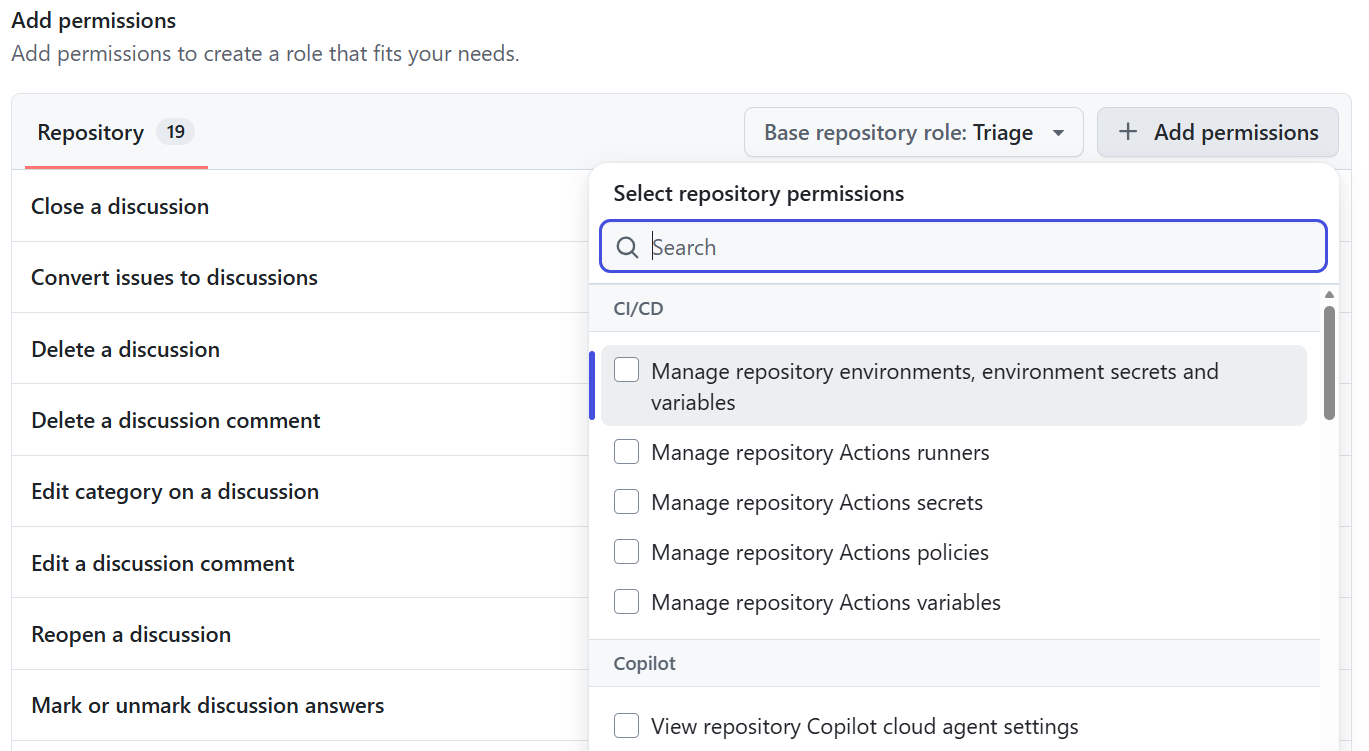
In a custom role, managing Actions secrets is a separate permission.
-
an Actions Data Stream that sends execution telemetry to your own storage and SIEM in near real time.
When GitHub published the roadmap in March, it expected these changes within three to nine months.
Why you should not wait for the defaults
Almost all of these protections are either opt-in for existing organisations, or they arrive as a breaking change once GitHub decides the risk is too high. The 2023 read-only default never reached older repositories. GitHub's Security Lab has found that many workflows still run with a token that can write everything, because older repositories kept their original default settings. The checkout fix reached workflows that use floating tags, but not the workflows that are pinned to a SHA, which is what security guidance used to recommend. Lock files now pin actions automatically, including their transitive dependencies, but it will take a long time before all existing workflows have moved to them. The pull_request_target default will be enforced on 2 November, whether your workflows are ready or not. If you enable a protection yourself, you can evaluate it first and fix what breaks. If you wait, the change happens on GitHub's schedule, and you find out when a workflow fails.
Five things to do now
GitHub has started to make Actions secure by default, but many of the new defaults only apply to new repositories, and require explicit enablement for existing ones.
For each area, the first list contains advice that security guidance has repeated for years[14], yet many organisations have still not followed. The second list contains the new features described earlier in this article.
1. Restrict token permissions
Every workflow run receives a GITHUB_TOKEN, and in older repositories that token can often still write almost everything. The less a token can do, the less an attacker can do with it after a leak.
What you should already be doing:
- Set the default workflow permissions to "Read repository contents and packages permissions" at enterprise and organisation level.
- Turn off "Allow GitHub Actions to create and approve pull requests".
- Require approval for workflow runs from all outside contributors, not only from first-time contributors.
- Start every workflow with
permissions: {}and grant permissions per job. UseGitHubSecurityLab/actions-permissionsto find the permissions each job needs.
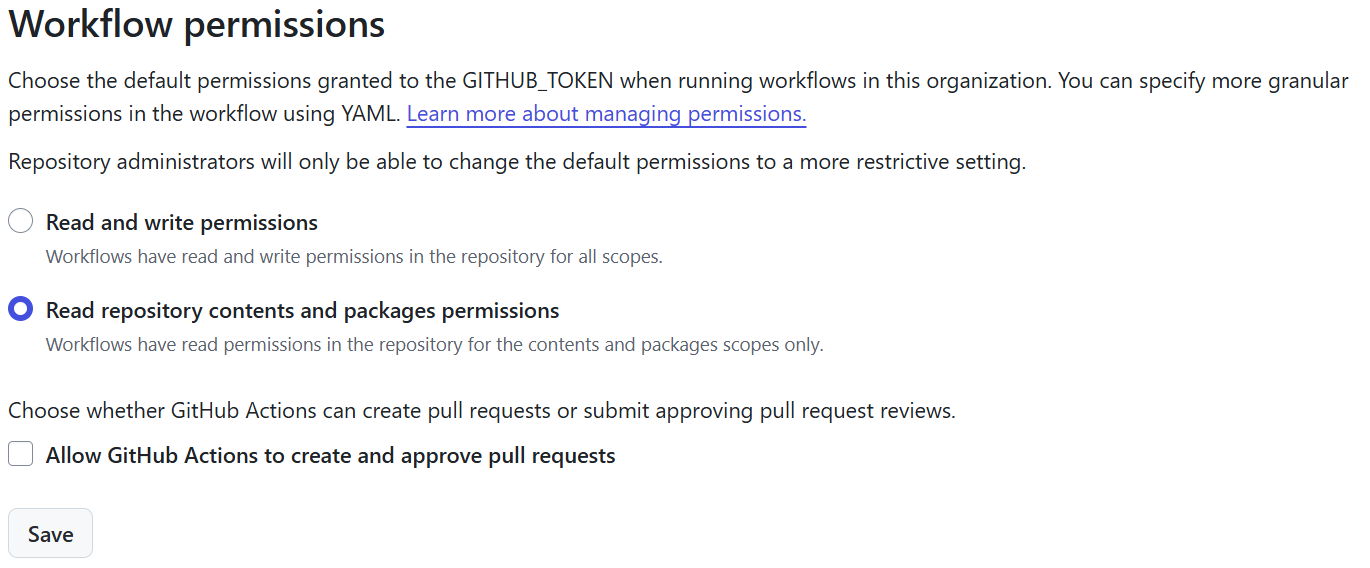
Read-only token permissions as the organisation default, and Actions not allowed to create or approve pull requests.
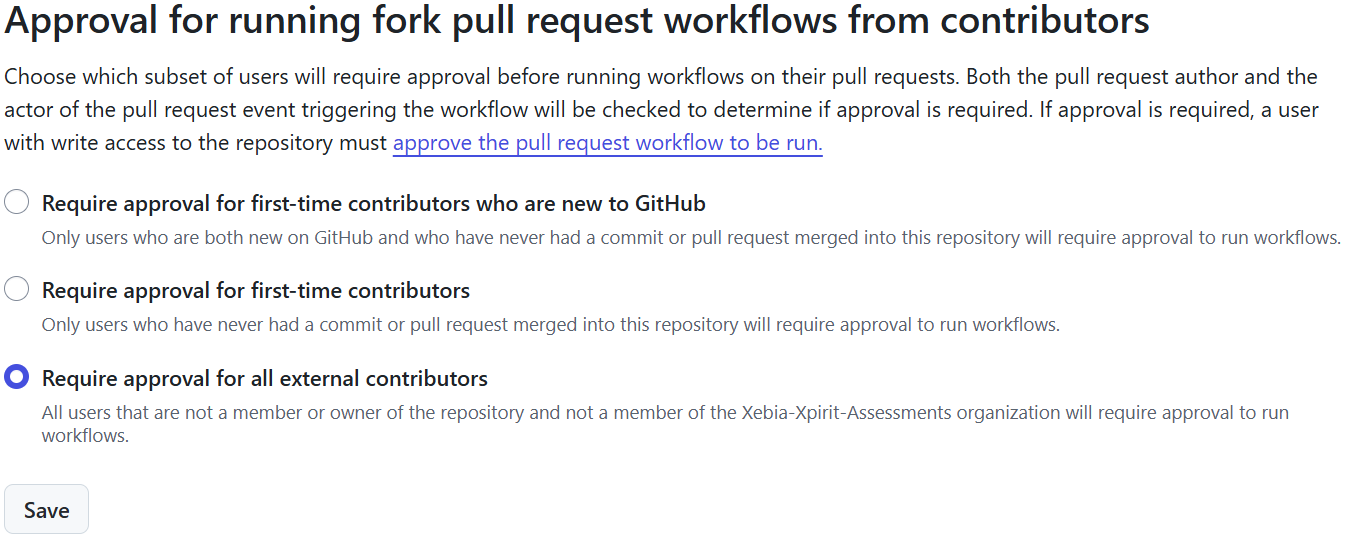
Require approval for all external contributors, not only for first-time contributors.
What to add now:
- Before you change the organisation default, use the missing-permissions query in CodeQL to find the workflows that do not declare the permissions they need.
- Set
cache-mode: readfor jobs that only restore a cache, andcache-mode: nonefor release jobs.
2. Limit who and what can trigger your workflows
A workflow is only as safe as the people and events that can start it, especially when it has access to secrets or can deploy.
What you should already be doing:
- Replace
pull_request_targetwhere you can. A normalpull_requesttrigger works for most cases. For most of the remaining cases, split the work into apull_requestworkflow and a privilegedworkflow_runworkflow, and treat everything that passes between them, including artifacts, as untrusted.
What to add now:
- Update workflows that pin
actions/checkout, so they receive the new protection against pull request checkouts. - Enable workflow execution protections in evaluate mode and review the insights. GitHub's default rule only covers public repositories, so add your own rules for private and especially internal repositories, where, depending on the default permissions of your enterprise, every member of the enterprise can trigger a workflow.
- Allow only maintainers to run
workflow_dispatchon deployment workflows.
3. Pin and lock your dependencies
Every action you use is code from someone else that runs with your token and secrets. Make sure that code cannot change without you noticing, and that you still receive updates in a controlled way.
What you should already be doing:
- Let Dependabot update your actions, and inspect the changes in those actions before you merge the updates.
- Add
actions/dependency-review-action[15] to your pull request checks and make it required, so a pull request that adds an action with a known vulnerability cannot be merged. - Be selective about the actions you use. Use fewer actions, and prefer maintainers who use immutable releases, pin their own dependencies and scan their own workflows. My trust checklist describes which signals matter and which do not[6:1].
What to add now:
- Commit a lock file with
gh-actions-lock, and prefer immutable release versions over bare SHAs. - Strengthen the "Require actions to be pinned to a full-length commit SHA" policy with the "Require lockfile" workflow execution protection.The new policy ensures that all workflows are covered by a lock file. Run the new rule in evaluate mode first, then enforce it.
- Configure a Dependabot cooldown of seven days instead of the default three.
- Reference actions in your own repository with
$/instead of./. - Where you still pin to a SHA, use
jessehouwing/actions-dependency-submission[9:1], so Dependabot and dependency review still see the versions you use.
4. Replace long-lived secrets
A secret that is stored in GitHub stays valid until someone rotates it, so a single leak can be used for months. Short-lived credentials that are issued for one job limit the damage to minutes.
What you should already be doing:
- Use OIDC for Azure, AWS and GCP instead of client secrets, access keys or certificates.
- Switch to trusted publishing for your packages.
- Store the remaining secrets in environments with required reviewers and deployment branch rules, and only give them to the job that needs them.
- Replace personal access tokens with a custom GitHub App and
actions/create-github-app-token.
What to add now:
- Switch your existing repositories to immutable subject claims[16], and update the trust policies at the same time.
- Use custom property claims[17] in your trust policies, instead of listing every repository by name.
- When you use
actions/create-github-app-token, limit every app token with therepositoriesandpermission-*inputs. - Use a custom role without "Manage repository Actions secrets" for people who do not need to manage secrets.
5. Scan your workflows and treat logs as public
Most of the attacks in this article started with a workflow problem that a scanner could have found. Assume that anything a workflow prints or uploads can be read by an attacker, and that you will need to respond quickly when something goes wrong.
What you should already be doing:
- Set
persist-credentials: falseunless the job needs to push. - Keep secrets out of command lines and URLs.
- Capture the output of tools that may print secrets, such as the Azure CLI.
- Scan logs and artifacts with tools such as TruffleHog or StepSecurity, and rotate every secret you find.
- Know how to revoke credentials in bulk when an incident happens.
What to add now:
- Enable the default setup of CodeQL, which includes Actions. Then make the results blocking with a "Require code scanning results" rule in a ruleset. Don't have GitHub Advanced Security? Use an alternative, like zizmor, in your CI.
- Run the egress firewall or set up
step-security/harden-runnerin log mode, and switch to enforce once your allow list is stable. - Know how to block a compromised action with the
!policy prefix.
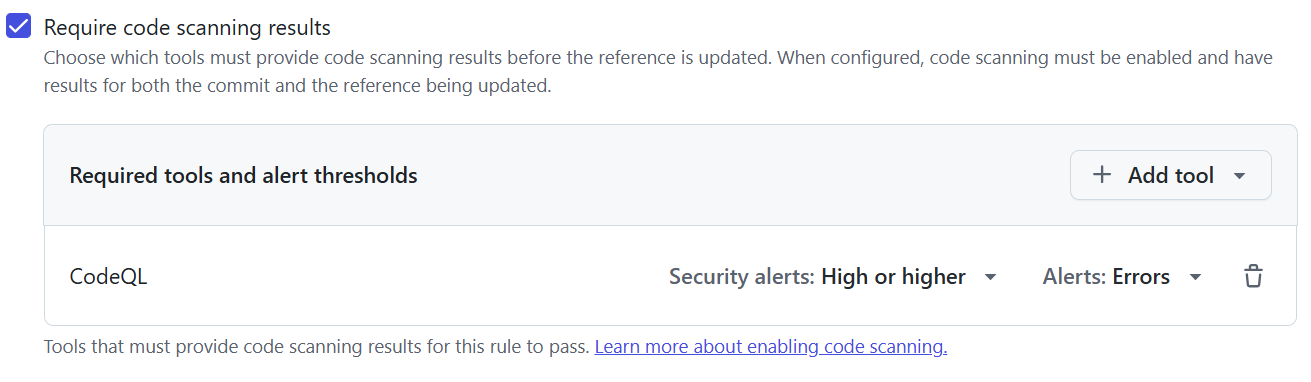
A ruleset that blocks a merge when CodeQL reports a high or critical security alert, or an error.
Conclusion
GitHub Actions has grown quickly since its original release, and for a long time its defaults favoured ease of use over security. Researchers warned about pwn requests, injections and cache poisoning for years, but it took a series of real attacks, from Ultralytics to tj-actions, Nx, Shai-Hulud, Trivy and Mini Shai-Hulud, before everyone started to take those warnings seriously.
The past year has brought the largest push for Actions security since the platform launched. GitHub has also changed its approach. Where it used to leave existing repositories untouched, it now enforces important changes, and it accepts breaking changes when that is what it takes to protect the ecosystem. It announces those changes in advance and usually offers an evaluate mode first, but the direction is clear: secure defaults will reach your existing repositories too.
That does not mean the work is done. Many of the new protections still have to be enabled, configured or adopted by the people who use Actions. Organisations have to review their settings, their workflows and their secrets. Authors of actions on the Marketplace have to protect their own repositories, publish immutable releases and pin their own dependencies, because everyone who uses their action depends on it.
I do not expect these to be the last changes. Agentic workflows and the Copilot coding agent use GitHub Actions as their runtime. They bring more automation with broader permissions, started by more events and influenced by more untrusted input, and all of it runs on the foundation described in this article. The protections of the past year are available today, but most of them only take effect in your organisation once you enable them.
Sidebar: If you publish actions
Everyone who uses your action depends on how well you protect your repository.
- Require two-factor authentication for every maintainer.
- Protect your version tags and release branches with rulesets, and prevent others from creating branches that look like version tags.
- Enable immutable releases and republish your existing releases to lock them.
- Keep the default token read-only.
- Pin your own dependencies, including
npxcalls in your scripts. - Reference actions in your own repository with
$/. - Attach an attestation to every release.
- Run GitHub Advanced Security for Actions or zizmor on your own workflows.
- Use the egress firewall to control and monitor outbound network traffic from your workflows.
My trust checklist lists these as signals that users should check before they adopt an action.
Further reading
Security Lab, "Preventing pwn requests": securitylab.github.com/resources/github-actions-preventing-pwn-requests ↩︎
Akamai, "Mini Shai-Hulud: The Worm Returns and Goes Public": akamai.com/blog/security-research/mini-shai-hulud-worm-returns-goes-public ↩︎
GitHub Actions 2026 security roadmap: github.blog/news-insights/product-news/whats-coming-to-our-github-actions-2026-security-roadmap ↩︎
"Towards a secure by default GitHub Actions": github.com/orgs/community/discussions/179107 ↩︎
About Actions policies: docs.github.com/actions/concepts/about-actions-policies ↩︎
A trust checklist for GitHub Actions: jessehouwing.net/a-trust-checklist-for-github-actions ↩︎ ↩︎
jessehouwing/actions-semver-checker: github.com/jessehouwing/actions-semver-checker ↩︎
github/gh-actions-lock: github.com/github/gh-actions-lock ↩︎
Improved dependency submission for GitHub Actions: jessehouwing.net/github-actions-improved-dependency-submission ↩︎ ↩︎
Native egress firewall: github.com/github-early-access/actions-native-egress-firewall ↩︎
actions/create-github-app-token: github.com/actions/create-github-app-token ↩︎
zizmor: docs.zizmor.sh ↩︎
GitHubSecurityLab/actions-permissions: github.com/GitHubSecurityLab/actions-permissions ↩︎
Security hardening for GitHub Actions: docs.github.com/actions/security-for-github-actions/security-guides/security-hardening-for-github-actions ↩︎
actions/dependency-review-action: github.com/actions/dependency-review-action ↩︎
Immutable subject claims for GitHub Actions OIDC tokens: github.blog/changelog/2026-04-23-immutable-subject-claims-for-github-actions-oidc-tokens ↩︎
Actions OIDC tokens now support repository custom properties: github.blog/changelog/2026-03-12-actions-oidc-tokens-now-support-repository-custom-properties ↩︎