Auto-assign GitHub Copilot AI Credit budget to users
The deadline for GitHub Copilot Usage Based Billing is approaching rapidly. And today I've been busy setting up automation to assign each user their own bucket of Copilot AIC budget.


The deadline for GitHub Copilot Usage Based Billing is approaching rapidly. And today I've been busy setting up automation to assign each user their own bucket of Copilot AIC budget.
On June 1st, all organizations should get access to the User Based Budgets and Universal User Budgets features in GitHub, allowing you to setup a a single universal budget for all your users as well as individual overrides which can either be higher or lower.
Setting up universal budget
To setup a universal budget, go to the enterprise's Billing & Licensing panel, select Budgets and Alerts in the left menu an create a new budget of type "Bundled AI Credits budget":
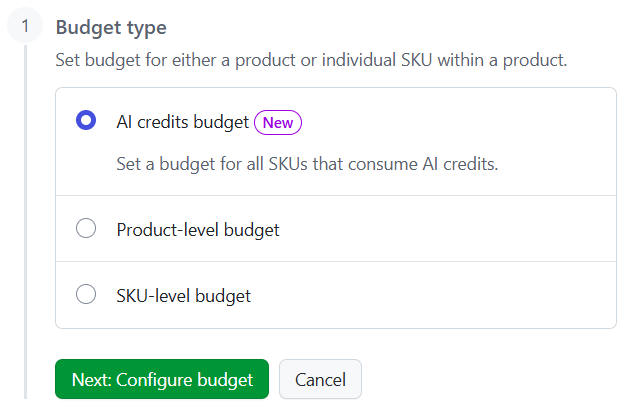
Then set a user level budget, but do not select any specific user:
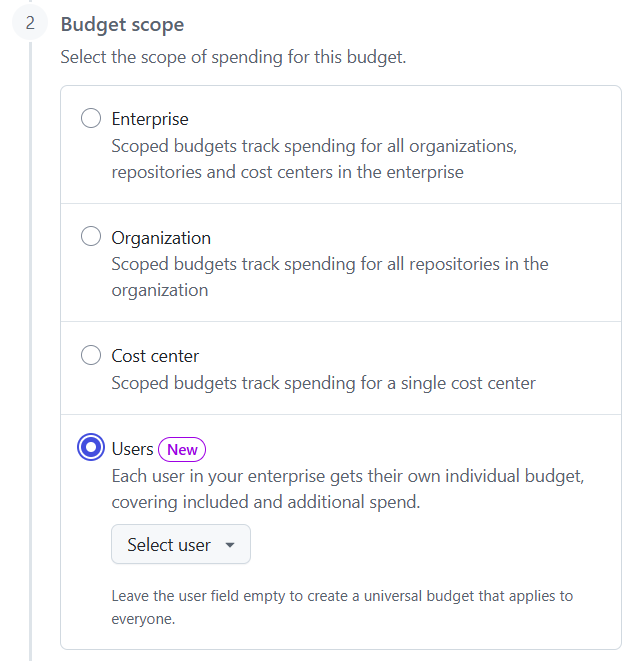
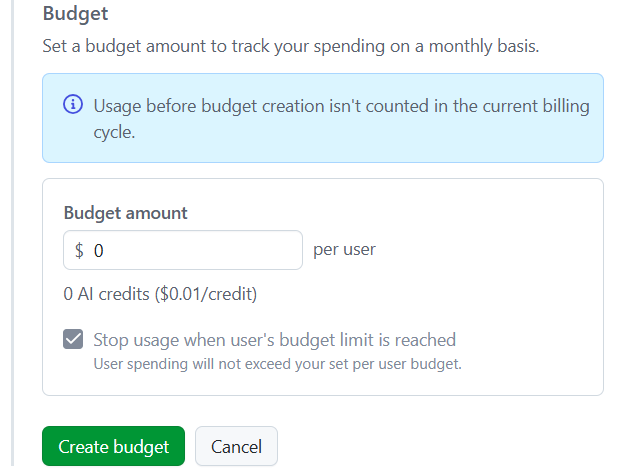
Finally select the default budget for all user without an individual budget override:
Setting an individual user budget
Setting an individual user budget follows the same flow, but in step 2 you need to select a specific user to which the budget applies:
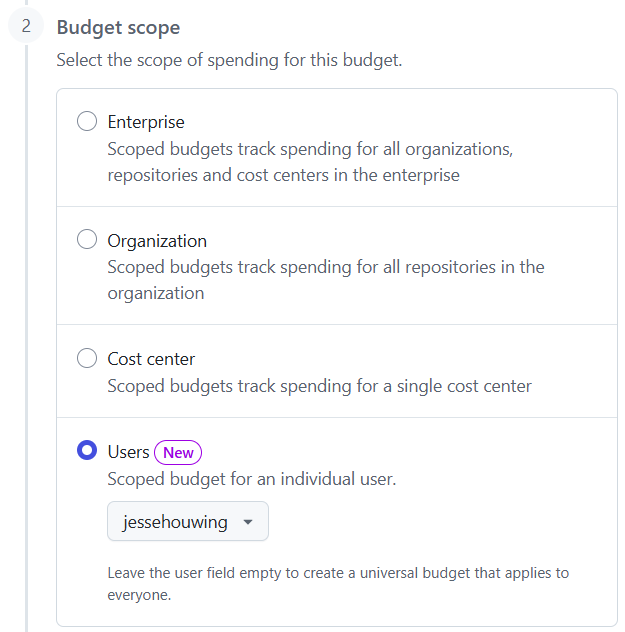
Unfortunately you can't select a team or multiple users in this step, so each user needs their own individual budget. As you can imagine, this is a lot of work if you want to have specific control over different sets of users.
Automating the problem away
Of course my employer is one of those places that wants control over specific groups of users. And because I'm a lazy administrator by nature, I'd like to be able to leverage our existing approval infrastructure as much as possible. Most approvals in our organization are handled by EntraID group memberships and there are existing approval workflows in Entra to allow people to request and approve access to specific groups.
GitHub, unfortunately, doesn't allow linking a user budget to a group or a team, so there needs to be a mapping from group membership to budgets somewhere. And I ended up putting that in a GitHub Actions workflow of course.
The workflow is quite simple:
- It pulls all copilot users from the assigned seats API.
- It pulls all users from EntraID
- It pulls all group memberships for the copilot users from EntraId
- It pulls all user level budgets from GitHub
- It compares the membership to the budget setup and either creates, updates or deletes the budget in GitHub.
And it sets the universal budget based on a preconfigured value.
All of this runs in a single GitHub Actions workflow an executes a single PowerShell script.
I won't share the full script here in the blog post, but I will share a few of the basic building blocks so you can implement your own logic based on your own criteria:
NOTE: There is a bug in the GitHub API, which returns "converted" budgets as PRU budgets, even though they show as AIC budgets in the UI. Updated logic below deletes and recreates the budget instead:
# Get existing Copilot budgets from the GitHub enterprise billing API.
function Get-ExistingBudgets {
    param(
        [string]$Enterprise,
        [string]$ProductSku
    )

    $allBudgets = @()
    $page = 1
    do {
        $response = invoke-gh -fromJson -- api "/enterprises/$Enterprise/settings/billing/budgets?page=$page"
        $allBudgets += $response.budgets
        $page++
    } while ($response.has_next_page)

    return $allBudgets
}

# Create a new individual per-user budget.
function New-IndividualBudget {
    param(
        [string]$Enterprise,
        [string]$GitHubLogin,
        [decimal]$Amount,
        [string]$ProductSku
    )

    $body = @{
        budget_amount         = $Amount
        budget_scope          = "user"
        user                  = $GitHubLogin
        budget_type           = "BundlePricing"
        budget_product_sku    = $ProductSku
        prevent_further_usage = $true
        budget_alerting       = @{
            will_alert       = $false
            alert_recipients = @()
        }
    }

    Write-Output "Creating individual budget of `$$Amount for user $GitHubLogin"
    $_ = ($body | ConvertTo-Json -Depth 5) | gh api --method POST /enterprises/$Enterprise/settings/billing/budgets --input -
}

# Update an existing budget amount.
function Update-Budget {
    param(
        [string]$Enterprise,
        [string]$BudgetId,
        [decimal]$Amount
    )

    $body = @{
        budget_amount         = $Amount
        prevent_further_usage = $true
    }

    Write-Output "Updating budget $BudgetId to `$$Amount"
    $_ = ($body | ConvertTo-Json -Depth 5) | gh api --method PATCH /enterprises/$Enterprise/settings/billing/budgets/$BudgetId --input -
}

# Delete a budget.
function Remove-Budget {
    param(
        [string]$Enterprise,
        [string]$BudgetId
    )

    Write-Output "Deleting budget $BudgetId"
    $_ = gh api --method DELETE /enterprises/$Enterprise/settings/billing/budgets/$BudgetId
}

# Ensure the universal budget exists and has the correct amount.
function Update-UniversalBudget {
    param(
        [string]$Enterprise,
        [string]$ProductSku,
        [decimal]$TargetAmount,
        $ExistingBudgets
    )

    $universalBudget = $ExistingBudgets | Where-Object { $_.budget_scope -eq "multi_user_customer" -and $_.budget_product_sku -eq $ProductSku }

    # Remove any stale universal budget with a different SKU (e.g. premium_requests -> ai_credits cutover)
    $staleUniversalBudgets = $ExistingBudgets | Where-Object { $_.budget_scope -eq "multi_user_customer" -and $_.budget_product_sku -ne $ProductSku }
    foreach ($stale in $staleUniversalBudgets) {
        Write-Output "Removing stale universal budget with SKU '$($stale.budget_product_sku)' (superseded by '$ProductSku')"
        Remove-Budget -Enterprise $Enterprise -BudgetId $stale.id
    }

    if ($universalBudget) {
        if ($universalBudget.budget_amount -ne $TargetAmount) {
            Write-Output "Updating universal budget from `$$($universalBudget.budget_amount) to `$$TargetAmount"
            Update-Budget -Enterprise $Enterprise -BudgetId $universalBudget.id -Amount $TargetAmount
        }
        else {
            Write-Output "Universal budget already set to `$$TargetAmount"
        }
    }
    else {
        Write-Output "Creating universal budget of `$$TargetAmount"
        $body = @{
            budget_amount         = $TargetAmount
            budget_scope          = "multi_user_customer"
            budget_type           = "BundlePricing"
            budget_product_sku    = $ProductSku
            prevent_further_usage = $true
            budget_alerting       = @{
                will_alert       = $false
                alert_recipients = @()
            }
        }
        $_ = ($body | ConvertTo-Json -Depth 5) | gh api --method POST /enterprises/$Enterprise/settings/billing/budgets --input -
    }
}
Because of the change from per-user premium request budget to AI credits and the additionally included credits during the promotional period from June 1st to August 31st I've added a few helpers:
function Get-BudgetProductSku {
    param(
        [datetime]$AsOf = [datetime]::UtcNow
    )
    return "ai_credits"
}

# Determine the universal budget amount based on the current date.
# June 1 - August 31 2026: $70
# September 1 2026 onwards: $39
function Get-UniversalBudgetAmount {
    param(
        [datetime]$AsOf = [datetime]::UtcNow
    )
    $sept1 = [datetime]::new(2026, 9, 1, 0, 0, 0, [System.DateTimeKind]::Utc)

    if ($AsOf -lt $sept1) {
        return [decimal]70.00
    }
    else {
        return [decimal]39.00
    }
}
Add your own logic to link a budget to a specific user, then call this from a simple workflow:
name: Assign Copilot Budgets

on:
  workflow_dispatch:
  schedule:
    - cron: "15 4 * * *"

jobs:
  update:
    permissions:
      contents: read
      id-token: write

    runs-on: ubuntu-latest

    steps:
    - uses: actions/checkout@de0fac2e4500dabe0009e67214ff5f5447ce83dd # v4
      with:
        fetch-depth: 0

    - name: Azure CLI Login
      uses: azure/login@532459ea530d8321f2fb9bb10d1e0bcf23869a43 #v3.0.0
      with:
        client-id: ${{ secrets.AZURE_CLIENT_ID }}
        tenant-id: ${{ secrets.AZURE_TENANT_ID }}
        allow-no-subscriptions: true

    - name: Assign Copilot Budgets
      run: |
         .\assign-copilot-budget.ps1
      env:
        GH_TOKEN: ${{ secrets.GH_TOKEN }}
      shell: pwsh
You'll need to use a Classic PAT token with at least the following scopes:
manage_billing:enterprise
manage_billing:copilot
read:enterprise
read:user
user:email
Access the full script
I've linked the full script below:
 262588213843476